


Overview
Run Kumo-Tabular and TabICLv2 predictions, plus Timestral and ci-proto forecasts, in Google Sheets.
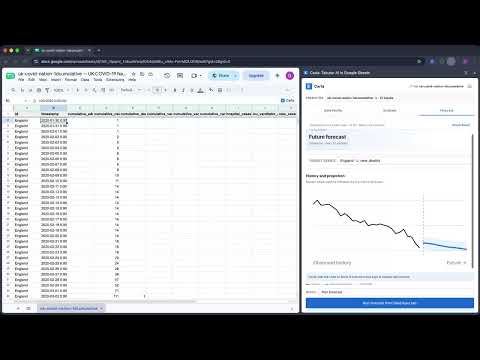
Run classification, regression, and time series forecasting directly in Google Sheets. Carla runs Kumo-Tabular Small, TabICLv2, Timestral-123M, and CI Proto locally in your browser. Select columns in your sheet, evaluate a tabular model, make predictions, or forecast a time series. Carla writes results back to spreadsheet cells. 📊 Why run models in your spreadsheet? Machine learning workflows often start by exporting a sheet to Python and end by pasting predictions back into cells. Carla keeps model inference in the browser and places the results where you already work. A cleaner sidebar and refreshed Carla branding make it easier to move from column selection to model evaluation and predictions. Tabular classification and regression with Kumo-Tabular Small or TabICLv2 Select a target column and feature columns, then choose Kumo Small or TabICLv2 in the Model & effort control. Kumo Small is the in-app label for Kumo-Tabular Small. Choose the number of Kumo estimators or TabICLv2 passes before fitting and evaluating. Carla handles categorical values, missing cells, dates, and numerical columns without a separate encoding or scaling pipeline. Time series forecasting with Timestral-123M or CI Proto Select a chronological date column and a numeric series, then choose a model and how far ahead to forecast. Timestral-123M is the default. To use CI Proto, select + Install models in the forecast model dropdown and install it from the Forecasting group. Both models run on your device through WebGPU. Carla writes the median forecast and the 10th and 90th percentiles into forecast cells. You can also map optional past-only or known-future covariates. 🧪 Train and test split evaluation For classification and regression, Carla splits data into training and test sets so you can inspect model quality before running predictions: • Classification metrics: Accuracy, ROC-AUC, F1-Score, Precision, Recall, and confusion matrices. • Regression metrics: Root Mean Squared Error (RMSE), Mean Absolute Error (MAE), and R² coefficient of determination. 🎲 Synthetic data generation Generate synthetic rows from existing columns for testing, development, and scenario modeling. 🔍 Local explainability (SHAP) For tabular predictions, Carla generates local SHAP waterfall charts that show how column values affected an individual result. Local model inference Carla does not send spreadsheet values to a separate model-inference API. Model preprocessing and inference run on your device. Google Sheets still syncs spreadsheet content through Google's services. ✨ Key capabilities: • Classification and regression: Choose Kumo-Tabular Small or TabICLv2 for spreadsheet columns. • Refreshed experience: A cleaner sidebar and updated branding, with model and effort choice together before evaluation. • Time series forecasting: Use Timestral-123M or CI Proto to generate a median forecast and prediction intervals. • Test split evaluation: Computes Accuracy, ROC-AUC, F1, Precision, Recall, RMSE, MAE, and R² out-of-sample. • Synthetic data generation: Creates realistic sample rows matching your column distributions. • Local SHAP charts: Explains individual predictions with visual feature attribution. • On-device inference: Run models through WebGPU without a separate model-inference API. 🚀 How to get started: 1. Open a sheet in Google Sheets and open the Carla sidebar. 2. For classification or regression, select a target and feature columns, choose Kumo Small or TabICLv2 and an effort level, then inspect evaluation metrics and run predictions. 3. For forecasting, select a date column and numeric series, choose Timestral-123M or CI Proto and a forecast horizon, and write predictions back to the sheet. Uses ci-proto, released by Continuous Intelligence. Continuous Intelligence does not endorse or approve this product or service. Model attribution and licence details: https://carlahq.eu/model-attribution#ci-proto Data and privacy: If you choose to connect Google Sheets, Carla accesses your Google name, email, available profile photo, a Google OAuth token, and the spreadsheet you use with the extension. Carla processes sheet cells locally for analysis and writes results to Google Sheets when you request it. Sheet selections, analysis results, and model data may be stored in your browser to resume work. This release does not send your Google profile, raw sheet rows, or local models to Carla's servers. See https://carlahq.eu/privacy for collection, storage, sharing, and deletion details.
0 out of 5No ratings
Details
- Version1.4.0
- UpdatedNovember 24, 2026
- Size81.79MiB
- LanguagesEnglish
- DeveloperWebsite
Email
dani.munch@gmail.com - Non-traderThis developer has not identified itself as a trader. For consumers in the European Union, please note that consumer rights do not apply to contracts between you and this developer.
Privacy

This developer declares that your data is
- Not being sold to third parties, outside of the approved use cases
- Not being used or transferred for purposes that are unrelated to the item's core functionality
- Not being used or transferred to determine creditworthiness or for lending purposes