

Stemmy: English Vocabulary Builder & AI Dictionary
1 rating
)
Overview
See what an English word means in your sentence, save it with its context, and remember it with short spaced-repetition reviews.
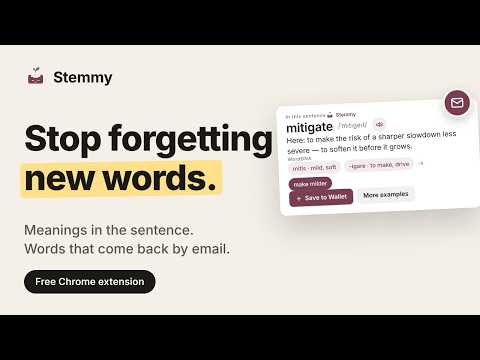
Stemmy is an AI English dictionary and vocabulary builder for Chrome. Highlight any word in an email, report, news article or doc to see its meaning in that exact sentence — then save it and remember it for good with spaced repetition. Built for non-native English readers, ESL learners and professionals who work in English every day: business emails, reports, documentation and news. Instead of a long list of dictionary senses, Stemmy explains what the word means right here, in your sentence. LOOK UP WORDS WITHOUT LEAVING THE PAGE • Ghost Card — highlight a word or press Ctrl+E (Cmd+E on Mac) for an instant, in-context definition: the meaning in your sentence, WordDNA word roots and etymology, and pronunciation. • X-Ray — scan a difficult page and find the words worth learning. BUILD YOUR OWN VOCABULARY LIST • Vocabulary Wallet — click Save to Wallet to keep each word with its meaning, the source sentence and a link to the page. Tag and search your words in the side panel or dashboard. • Sync and export — your Wallet syncs across your Chrome browsers when you're signed in, and exports or imports as JSON. REMEMBER WHAT YOU SAVE • Reviews — short spaced repetition sessions (FSRS / SM-2 flashcard scheduling) with Again, Hard, Good and Easy. • Immersion (optional) — meet your saved words again on pages you read, with one click back to the original text. • AI Stories — short reading passages built from the words in your review queue. • Wallet Letters (optional, beta) — a daily or weekly email built around your saved words. ACCOUNT AND FREE AI USES AI features need a free Stemmy account (Google Sign-In or email). Every account includes 150 free AI uses in total — a one-time allowance that does not reset. Ghost Card lookups and Cloud Voice both use it. GET STARTED IN 30 SECONDS 1. Add Stemmy to Chrome. 2. Open the side panel and sign in with Google or email. 3. Highlight a word on any page and click Save to Wallet. Stemmy turns the words you find into words you know. PRIVACY Your Vocabulary Wallet, Reviews and settings are stored in your browser. Words you look up are sent with their sentence to our AI provider to explain them. Stemmy does not sell your data or track your general browsing history. You can export or delete your data anytime. Learn more: https://stemmy.app Privacy policy: https://stemmy.app/privacy
5 out of 51 rating
Details
- Version1.4.0
- UpdatedOctober 27, 2026
- Size1.9MiB
- LanguagesEnglish
- Developer
Email
vasimkk000@gmail.com - Non-traderThis developer has not identified itself as a trader. For consumers in the European Union, please note that consumer rights do not apply to contracts between you and this developer.
Privacy

Stemmy: English Vocabulary Builder & AI Dictionary has disclosed the following information regarding the collection and usage of your data. More detailed information can be found in the developer's privacy policy.
Stemmy: English Vocabulary Builder & AI Dictionary handles the following:
This developer declares that your data is
- Not being sold to third parties, outside of the approved use cases
- Not being used or transferred for purposes that are unrelated to the item's core functionality
- Not being used or transferred to determine creditworthiness or for lending purposes