


Overview
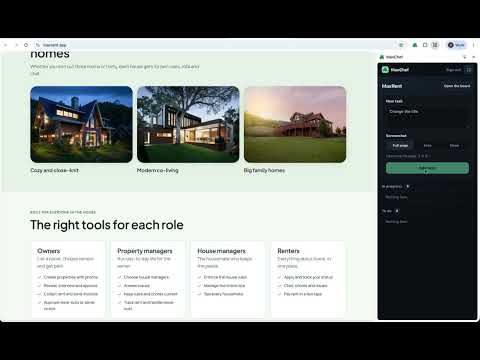
See and add tasks, with a screenshot, while you browse a site you build with MaxChef.
Report what should change on your site while you're looking at it. MaxChef builds and runs your app from plain-language tasks; this extension puts that task list next to the site itself. Open the extension on any site you build with MaxChef to: • See what's in progress and what's still to do for that project. • Add a task in your own words, with the page's address attached. • Attach a screenshot of the full page, or drag a box over just the part you mean. • Keep it open in Chrome's side panel while you click around your site. Sign in with your MaxChef account. The extension only works on sites that belong to projects you own, manage, or are a team member of, and new tasks go straight to that project's board.
5 out of 51 rating
Details
- Version0.2.0
- UpdatedOctober 9, 2026
- Size32.72KiB
- LanguagesEnglish
- DeveloperMaxpoints LLCWebsite
18121 East Hampden Drive Unit C 1244 Aurora, CO 80013 USEmail
ext@maxpoints.comPhone
+1 720-445-5565 - TraderThis developer has identified itself as a trader per the definition from the European Union and committed to only offer products or services that comply with EU laws.
- D-U-N-S145076494
Privacy

MaxChef has disclosed the following information regarding the collection and usage of your data. More detailed information can be found in the developer's privacy policy.
MaxChef handles the following:
This developer declares that your data is
- Not being sold to third parties, outside of the approved use cases
- Not being used or transferred for purposes that are unrelated to the item's core functionality
- Not being used or transferred to determine creditworthiness or for lending purposes
Support
For help with questions, suggestions, or problems, visit the developer's support site