

MAX - Design Power-Pack - Color, Asset, Save, Edit, Search, Screen Grabber
3 ratings
)
Overview
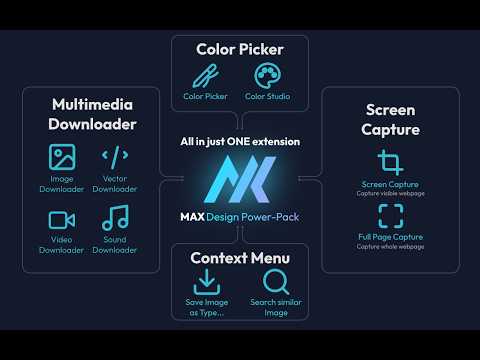
All-in-one premium design suite: Color Picker & Studio, Screen Grabber & Video Recorder, and Multimedia Asset Downloader.
MAX is a high-performance, local-first browser extension that consolidates color picking, high-resolution screen capture, multimedia asset scraping, and image editing into a single tool — 100% free with no account required. Built with native Web APIs and Vanilla JavaScript, MAX runs entirely on your local machine with zero external network requests, zero telemetry, and zero tracking. ━━━━━━━━━━━━━━━━━━━━━━━━━━━━━━━━━━━━ ✦ CORE FEATURES ━━━━━━━━━━━━━━━━━━━━━━━━━━━━━━━━━━━━ [ 1 ] COLOR PICKER & COLOR STUDIO ▸ System-Wide Eyedropper: Samples any pixel with exact accuracy across your entire display, including areas outside the browser window. ▸ Color Variations & Harmonies: Generates monochromatic, analogous, and complementary palettes, adjusts real-time HSL/RGB values, and calculates WCAG contrast ratios. ▸ Multi-Format Export: Automatically logs sampled colors and exports directly to HEX, RGB, HSL, or CMYK formats. [ 2 ] SCREEN CAPTURE & IMAGE EDITOR ▸ Multi-Mode Capture: Captures custom selected regions, the visible viewport, or entire scrollable webpages with single-pass rendering. ▸ Resolution Scaling (1x, 2x, 3x): Re-renders and exports screenshots at up to 3x high-DPI resolution for crisp typography and fine details. ▸ Dimension Limit Control: Sets maximum width or height thresholds to prevent oversized outputs while preserving original aspect ratios. ▸ Screen & Tab Recording: Records active browser tabs or your full desktop into high-definition video captures with optional audio capture. ▸ In-Browser Annotation: Edits screenshots and web images using brush tools, geometric shapes (rectangles, ellipses, polygons, lines), text labels, and cropping with full undo/redo history. ▸ Dedicated Workspace: Opens any image into an expanded editor tab for extended markup workflows. ▸ Capture History Management: Saves captures to local disk without consuming extension storage memory, with direct one-click clipboard copying and file downloads. [ 3 ] ASSET SCRAPER & DOWNLOADER ▸ DOM Resource Extraction: Scans webpages to identify standard images, CSS background assets, inline vectors, video files, and audio tracks. ▸ Resource Filtering & Search: Filters extracted media by asset category, dimensions, aspect ratio (portrait, landscape, square), or keyword search. ▸ Clean Vector Extraction: Converts inline vector elements into downloadable graphic files or copies clean raw markup directly to the clipboard. ▸ Batch Downloading: Downloads selected media items or packages all detected page assets in a single operation via Chrome's download engine. [ 4 ] RIGHT-CLICK CONTEXT TOOLS ▸ Save Image As Type: Converts and saves any web image directly into common graphic or document formats on the fly. ▸ Send to Editor: Sends any web image directly into the MAX Image Editor with a single right-click. ▸ Video Speed & Audio Control: Controls HTML5 video playback speed (0.25x to 4x) and boosts audio volume up to 400% using customizable keyboard shortcuts. ▸ Reverse Image Lookup: Triggers reverse image queries on Yandex or TinEye to find high-resolution original sources and duplicates. ━━━━━━━━━━━━━━━━━━━━━━━━━━━━━━━━━━━━ ✦ PRIVACY & PERMISSIONS ━━━━━━━━━━━━━━━━━━━━━━━━━━━━━━━━━━━━ ▸ Offline Architecture: All image conversions, DOM parsing, and color sampling execute purely client-side without third-party APIs. ▸ activeTab & scripting: Required to sample screen pixels and extract media resources from the current webpage. ▸ downloads: Required to save captured screenshots, converted media, and extracted assets to your local drive. ▸ storage: Required to store color history and user preferences locally (chrome.storage.local). ▸ contextMenus: Required to provide right-click tools (Save Image As Type, Send to Editor, Reverse Search). ▸ debugger: Temporarily attached only during 2x/3x captures to enforce device metric scaling. ━━━━━━━━━━━━━━━━━━━━━━━━━━━━━━━━━━━━ ✦ USE CASES ━━━━━━━━━━━━━━━━━━━━━━━━━━━━━━━━━━━━ ▸ Designers: Extracting web assets, sampling colors across apps, testing contrast compliance, and annotating feedback. ▸ Developers: Auditing page media, extracting clean SVG code, and capturing high-DPI UI screenshots. ▸ Content Creators: Bulk-downloading media assets, converting image formats on the fly, and accelerating video reviews.
5 out of 53 ratings
Details
- Version1.3.0
- UpdatedAugust 24, 2026
- Offered byTrần Thắng Minh
- Size401KiB
- LanguagesEnglish
- DeveloperTrần Thắng Minh
58/11A, Lý Nam Đế, Ấp 29, Xã Hóc Môn Hồ Chí Minh, Thành phố Hồ Chí Minh 71700 VNEmail
maxiechen96@gmail.com - Non-traderThis developer has not identified itself as a trader. For consumers in the European Union, please note that consumer rights do not apply to contracts between you and this developer.
Privacy

This developer declares that your data is
- Not being sold to third parties, outside of the approved use cases
- Not being used or transferred for purposes that are unrelated to the item's core functionality
- Not being used or transferred to determine creditworthiness or for lending purposes
Support
For help with questions, suggestions, or problems, please open this page on your desktop browser