


總覽
Convert PDFs to LaTeX, DOCX, Markdown, and more
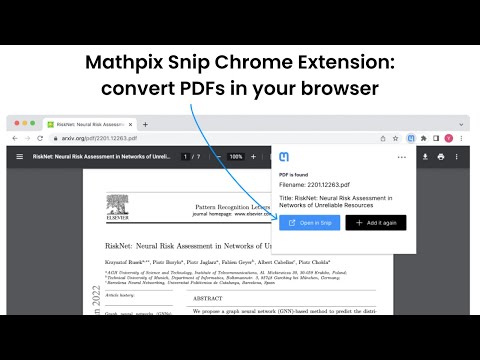
Mathpix Snip: read, search, and convert scientific PDFs. Convert PDFs to LaTeX, DOCX, Markdown, and more. The Mathpix Snip Chrome extensions makes it possible to upload a PDF in your browser to your PDF collection in Snip instantly. It’s a key tool all STEM researchers need to stay on top of their fields. We make it easy and intuitive to create a searchable, exportable collection of PDFs from Arxiv.org and other online resources. Once in Snip, you can search and read your PDFs on any device, with the ability to export your documents to DOCX, HTML, LaTeX, and Markdown. You can also extract text from your PDFs and create research summaries via our Mathpix Markdown document editor in Snip. This Chrome extension has special features for Arxiv.org, including automatic naming of your PDF files, metadata extraction, and duplication detection to prevent adding the same PDF to your collection twice. This Chrome extension also integrates perfectly with the iOS and Android Snip apps, so that you can read your PDFs on the go, including an HTML view of the document so you can read PDFs comfortably on your phone without having to zoom into your document to compensate for small font sizes. We believe that if we make it pleasant for users to work with research PDFs, researchers will spend more time actually reading and studying them, and discover more connections, and ideas. It's frustrating enough to be a researcher, why make it harder than it needs to be by using business oriented storage software to manage your research PDFs?
4.3 分 (滿分 5 分)20 個評分
詳細資料
- 版本1.0.6
- 已更新2025年7月15日
- 提供者Mathpix
- 大小2.01MiB
- 語言English
- 開發人員Mathpix, Inc.
60 Broadway, Suite 101 Brooklyn, NY 11249 US電子郵件
support@mathpix.com - 非交易商這位開發人員並未表明自己是交易商。歐盟地區的消費者請注意,消費者權利不適用於你和這位開發人員之間簽訂的合約。
隱私權

這位開發者就你的資料做出下列聲明:
- 除經核准的用途外,不會將你的資料販售給第三方
- 不會基於與商品核心功能無關的目的,使用或轉移資料
- 不會為了確認信用度或基於貸款目的,使用或轉移資料
支援
如有疑問或建議,請使用電腦版瀏覽器開啟這個頁面