

MathDocs CAS

Overview
Write advanced maths in Google Docs™. Solve equations, use calculus and matrices, and insert results as you write.
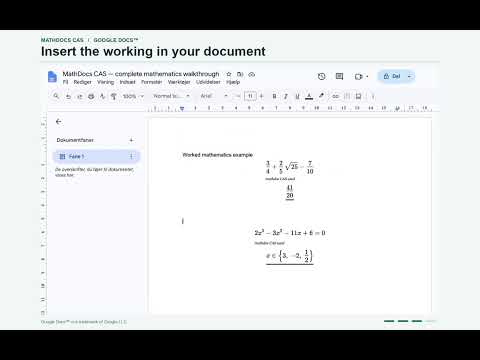
Work through advanced mathematics as you write in Google Docs™. Open a visual math field on the page, solve a polynomial with exact roots, differentiate an expression, invert a matrix or plot a function. Insert the formatted working and result alongside your explanation and continue writing. Open Symbols to search for constants, Greek letters, calculus templates and their shortcuts. Adjust graph axes with decimal commas or points and keep unfinished work in the draft for that formula. SETUP Install both this Chrome extension and the MathDocs CAS Google Docs™ add-on for the complete on-page workflow. The Docs add-on supplies document access and saving; this extension supplies the on-page fields and shortcuts. Install and authorize the Docs add-on before inserting work. Open the MathDocs toolbar icon for setup links and the shortcut for your system. Installing the extension does not install the add-on automatically. Install the Docs add-on: https://workspace.google.com/marketplace/app/mathdocs_cas/603315443505 Step-by-step setup: https://math.skaybase.com/support.html SETUP GUIDANCE If the Docs component cannot be found, a small reminder links to the missing part of the installation. Your expression stays in the field. The setup guide is also available in Help. KEYBOARD Windows: Ctrl+M opens the field and calculates when the field is open. Mac: Option+M opens or focuses the field and Option+S calculates. Enter calculates on both platforms. Alt+P / Option+P plots. Ctrl+Enter / Cmd+Enter inserts the result. Standard shortcuts apply inside Google Docs™ and the editor. COLLABORATION Saved formulas are PNG images containing mathematical source and calculation metadata. Collaborators can see and print them without MathDocs. Double-click an inserted MathDocs formula on the document page with the Chrome companion to edit its source. These images are not native Google equation objects. Used variable values travel with a saved calculation, including used private values. DATA AND PERFORMANCE The visual editor calculates in a local browser worker. Google Apps Script™ handles insertion and document storage, so saving requires a Google connection and can take longer than calculation. Local drafts help recover interrupted work. The legacy native-equation menu calculates through Google Apps Script™. There are no ads, analytics or independent formula servers. Google Docs™, Google Chrome™, Google Workspace™, Google Drive™ and Google Apps Script™ are trademarks of Google LLC. MathDocs CAS is an independent product and is not affiliated with or endorsed by Google LLC.
0 out of 5No ratings
Details
- Version2.0.14
- UpdatedNovember 19, 2026
- Offered bySkaybase
- Size2.67MiB
- LanguagesEnglish
- Developer
Email
contact@skaybase.com - Non-traderThis developer has not identified itself as a trader. For consumers in the European Union, please note that consumer rights do not apply to contracts between you and this developer.
Privacy

MathDocs CAS has disclosed the following information regarding the collection and usage of your data. More detailed information can be found in the developer's privacy policy.
MathDocs CAS handles the following:
This developer declares that your data is
- Not being sold to third parties, outside of the approved use cases
- Not being used or transferred for purposes that are unrelated to the item's core functionality
- Not being used or transferred to determine creditworthiness or for lending purposes
Support
For help with questions, suggestions, or problems, visit the developer's support site