

SodaFox | Mass Downloader for IG – Safe Bulk Download

Overview
Bulk download all Instagram profile posts, photos, videos, Reels, Stories & Highlights. Custom names and folders; skip duplicates.
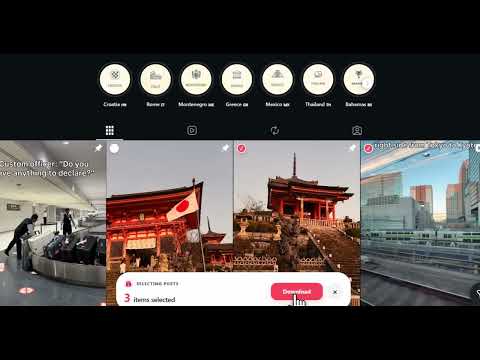
Download Instagram Reels, Stories, Photos, Videos, Highlights, and Posts — safely, quickly, and in bulk. Mass Downloader for Instagram is the professional Chrome extension for bulk downloading and backing up Instagram content directly inside your browser. No third-party downloader websites. No login required. No complicated setup. No risky redirects. No unnecessary permissions. Everything works directly inside Chrome for a safer and more private download workflow. Designed for reliable Instagram profile backup, organized bulk downloads, competitor research, content management, archive workflows, and saving new content without downloading the same files again. Recent Updates — shaped by user feedback. New feedback is always welcome at support@igmate.net. 2026-10-16 - NEW: bulk download Instagram Series directly from the Series tab on a profile. Select one or more Series to save all their episodes, or use Download All to save every Series on that profile. - Organize downloaded episodes into folders named after each Series. - Add the Series name and original episode number to custom file names. Optional video covers use matching names. 2026-10-13 - Expanded optional video cover downloads to Stories, Highlights, and videos within carousel posts. - Improved carousel file naming to preserve the original media order and keep video covers paired with their videos. - Fixed publication dates in custom file names for Tagged posts and Reposts. 2026-10-10 - Improved loading of Saved collections for more reliable downloads. - Preserved the original username format, including leading and repeated underscores, in downloaded file names, ZIP names, and folders. 2026-09-25 - Improved Story download reliability after recent Instagram changes. - Improved Tagged post downloads after recent Instagram changes. Sep 24 - Added a {userid} token for custom file naming. - Fixed several bugs and improved overall stability. Sep 14 - Preview and refresh how many new Profile Posts and Reels are available before using Download New. - Improved Download New estimates, with clearer counts and easier Instagram reconnection when needed. - Request new naming options directly from the naming editor. Sep 5 - Restored Download All for profile Posts and Reels after recent Instagram changes. - Restored Download All for Saved content, including All posts and individual collections. - Improved the reliability of loading profiles and content when Instagram changes how its data is delivered. Sep 2 - Added media filters for Story and Highlight downloads, letting you choose Photos + Videos, Photos only, or Videos only. - Added quick content settings beside the Story and Highlight download buttons. Your selection is saved as the default for future downloads. - Moved the Highlight cover option into the new content settings menu and improved keyboard accessibility. Aug 27 - Improved Download New account management with separate Remembered and Used account views and refreshed profile pictures. - Updated our download engine to stay compatible with Instagram's latest API changes, keeping Profile Reels and Reposts downloads reliable. - Fixed an issue where some post and Reel links could not be selected when their URLs varying. Aug 16 - Fixed the bug of the downloading button not appeared on some pages. Aug 13 - Added download by links, you can upload a list of url and download them in one click. - Added download one certain story, not all stories of some user. - Support download HD quality reels. July 28 - Added an option to include each Highlight’s cover image when downloading Highlights. - Added an optional ZIP-only setting to preserve Instagram publication dates in JPEG photo metadata (EXIF). - Improved Stories download reliability July 24 - Improved reliability for Profile Reels downloads and Download New. - Improved Download New workflows after Range downloads. July 20 - Added download content filters: Photos only, Videos only, and Reel cover only. July 9 - Added Download New: return to a profile and download only content added since your previous download. - Added Download New setup, sign-in guidance, and download history in Settings. - Added download-new activity tracking to help identify new items for each account. June 26 - Added a one-click Download All entry on Saved pages, making it faster to collect everything you want in one flow. - Improved Story downloading so “Download current” saves the exact Story you are viewing. - Added a quick Settings shortcut in the popup for easier access to customization options. - Fixed a white screen issue in the feedback flow for a smoother support experience. June 21 - Improved Instagram Stories download reliability. - Fixed an issue that could cause some Stories downloads to fail. June 13 - Added a clearer post-download summary with a failed items list, so it is easier to see what was completed and what needs another try. - Improved failure handling for a more transparent and reliable download experience. June 12 - Improved the Naming Settings UI to make ZIP file names, media file names, and folder rules easier to customize. - Added support for organizing Instagram Highlights downloads by Highlight collection, keeping files grouped by each Highlight name inside the ZIP. May 24 - Added a one-click download all button on Instagram profile pages. - Improved file naming rules for cleaner ZIP and media file names. May 12 - Added support for downloading Instagram Stories. May 2 - Fixed a Reels selection issue to improve bulk download reliability. KEY FEATURES • Safe Bulk & Single Download Download one post or entire batches of Instagram content with a fast, clean, and reliable workflow. Everything works directly inside Chrome — no external downloader websites, no login required, and no hidden redirects. • Full Profile Backup Back up complete Instagram profiles including: - Posts - Reels - Stories - Highlights - Photos & Videos Perfect for content backup, competitor research, inspiration libraries, and archive workflows. • Download New — Save Only New Content Download only new content added since your previous download, without downloading the same files again. Ideal for regularly backing up Instagram profiles and keeping your archive up to date. • Built for Larger Bulk Downloads Designed for larger Instagram profiles and bigger bulk download tasks. Save available posts, reels, stories, highlights, photos, and videos into organized ZIP files. Large downloads can be split into smaller ZIP archives, making big profile downloads easier to manage and archive. • Smart ZIP Export Downloads are packaged into organized ZIP files with readable names and structured folders. Large downloads can be easier to manage, verify, and archive. Perfect for large-scale backups and team workflows. • Custom File Naming & Folder Organization Customize how future downloads are named and organized. You can edit: - ZIP File Name - Media File Name - Folder Structure Available name parts may include: - User ID - Username - Download time - Publish time - Content type - Shortcode - Media ID - Title or caption text when available - Likes count, comments count, views count, and location when available This helps avoid messy folders and random filenames. • Advanced Selection Modes Choose exactly what to download: - Manual Select - Range Select - Time Range Download only what matters. • Supports All Major Instagram Content Types - Posts - Stories - Highlights - Reels - Photos - Videos • Hashtag & Location Download Save public Instagram posts from hashtag pages and location pages. WHY USERS CHOOSE THIS EXTENSION • Works directly inside Chrome • No external downloader websites required • No login required • No hidden redirects • Safe and reliable • Built for professional workflows • Better folder organization than basic downloaders If you need more than a simple Instagram downloader, this is the tool built for scale. IMPORTANT This extension is an independent third-party tool and is not affiliated with, endorsed by, sponsored by, or officially associated with Instagram or Meta Platforms, Inc. Please respect Instagram’s Terms of Service and copyright laws when downloading content.
4.6 out of 5259 ratings
Details
- Version5.0
- UpdatedOctober 17, 2026
- FeaturesOffers in-app purchases
- Size6.9MiB
- Languages55 languages
- Developer
- Non-traderThis developer has not identified itself as a trader. For consumers in the European Union, please note that consumer rights do not apply to contracts between you and this developer.
Privacy

SodaFox | Mass Downloader for IG – Safe Bulk Download has disclosed the following information regarding the collection and usage of your data. More detailed information can be found in the developer's privacy policy.
SodaFox | Mass Downloader for IG – Safe Bulk Download handles the following:
This developer declares that your data is
- Not being sold to third parties, outside of the approved use cases
- Not being used or transferred for purposes that are unrelated to the item's core functionality
- Not being used or transferred to determine creditworthiness or for lending purposes
Support
For help with questions, suggestions, or problems, please open this page on your desktop browser