

Bookmark Wallpaper
14 ratings
)
Overview
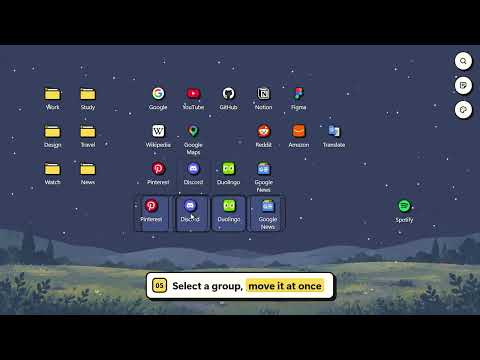
Turn your new tab into a desktop with bookmark icons, folder windows, sticky notes and themes.
Turn your new tab into your own desktop. Bookmark Wallpaper lays out your Chrome bookmarks as icons, just like the desktop on your computer. Drag them wherever you like, and your favorite sites are right there every time you open a new tab. ■ Features • Bookmark desktop – Bookmarks and folders from your Bookmarks Bar appear as icons you can arrange freely by dragging. • Folder windows – Click a folder to open it in a window. Drag bookmarks in and out, and sort by recently added, name or bookmark order. • Multi-select – Drag a box to select several icons and move or delete them at once. • Quick search – Press Ctrl+F to search all your bookmarks and jump to where a bookmark is. • Sticky notes – Pin notes to your desktop with colors, titles and collapsing. Save them to a file and load them back anytime. • Customize – Choose a Light, Beige or Dark theme and a wallpaper, or use your own image. • Pinned images – Drop an image file onto the desktop and resize it however you like. ■ How to use • Right-click an empty spot to create a new folder or sticky note. • Right-click an icon to rename or delete it. • Use the buttons at the top right for search, sticky notes and customization. ■ Privacy Your bookmarks and settings stay in your browser. Nothing is sent to any server.
4.7 out of 514 ratings
Details
- Version2.1.0
- UpdatedOctober 23, 2026
- Offered byrkrp.app.maker
- Size242KiB
- Languages51 languages
- Developer
Email
rkrp.app.maker@gmail.com - Non-traderThis developer has not identified itself as a trader. For consumers in the European Union, please note that consumer rights do not apply to contracts between you and this developer.
Privacy

This developer declares that your data is
- Not being sold to third parties, outside of the approved use cases
- Not being used or transferred for purposes that are unrelated to the item's core functionality
- Not being used or transferred to determine creditworthiness or for lending purposes
Support
For help with questions, suggestions, or problems, please open this page on your desktop browser