

MarkSpace

Overview
A local-first visual workspace for your bookmarks.
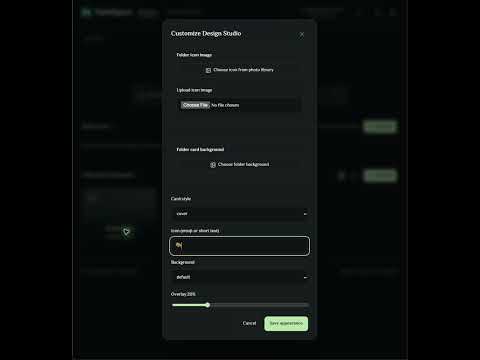
Turn your New Tab into a personal visual workspace for the links you use every day. MarkSpace helps you organize Chrome bookmarks for work, study and everyday browsing — with a clean layout that feels like your own space. • Organize folders and links in visual cards or a focused list. • Pin your daily destinations to Quick Access. • Search your saved bookmarks and folders. • Personalize folder covers, icons, backgrounds and light or dark themes. • Import bookmark HTML and export portable MarkSpace backups. • Use Arabic or English, with right-to-left support for Arabic. • Enable optional prayer times and reminders. OPTIONAL GOOGLE DRIVE SYNC Connect your own Google Drive to synchronize bookmarks, folders, settings and selected backgrounds between devices. Sync reads Drive changes, merges independent edits, applies the result locally and uploads it. If changes conflict, choose the version to keep. Scheduled sync runs while Chrome is running; sleep, offline conditions or account authorization can delay it. Chrome bookmark sync is separate from MarkSpace sync. Device cards show recorded activity, not live presence. LOCAL FIRST Local use needs no Google account. MarkSpace is free to use. Google Drive sync is optional and uses your own account and its storage limits. Full cloud backups can include selected images, custom audio, prayer location and a saved Pexels API key. Optional Pexels browsing requires your own key. Review the privacy policy before connecting cloud services. Support: https://basuony.com/markspace/
0 out of 5No ratings
Details
- Version0.28.9
- UpdatedOctober 7, 2026
- Offered bymbasuony83
- Size7.08MiB
- Languages2 languages
- DeveloperMahmoud Ezzat Mahmoud
المنصورة، مدينة طلخا، مركز طلخا، مصر بلطيم, كفر الشيخ 33729 EGEmail
mbasuony83@gmail.com - Non-traderThis developer has not identified itself as a trader. For consumers in the European Union, please note that consumer rights do not apply to contracts between you and this developer.
Privacy

MarkSpace has disclosed the following information regarding the collection and usage of your data. More detailed information can be found in the developer's privacy policy.
MarkSpace handles the following:
This developer declares that your data is
- Not being sold to third parties, outside of the approved use cases
- Not being used or transferred for purposes that are unrelated to the item's core functionality
- Not being used or transferred to determine creditworthiness or for lending purposes
Support
For help with questions, suggestions, or problems, visit the developer's support site