

Markpad: Snippets, Vocabulary, Notes & To-do

Overview
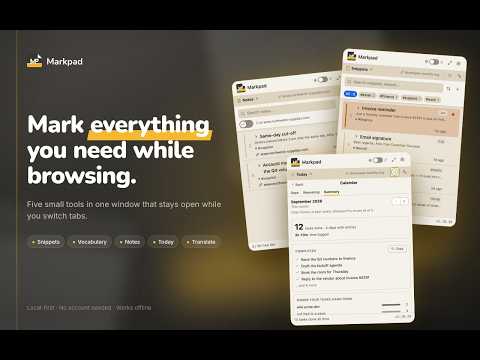
Text expander snippets, vocabulary flashcards, sticky page notes, a daily to-do list and translation — one window while you browse.
Markpad is a text expander, vocabulary builder, sticky-notes app and daily to-do list in one Chrome window — built for people who are constantly jotting notes, looking up words, copy-pasting, translating, and keeping track of tasks while they browse. Click the icon and Markpad opens in its own compact window instead of the usual dropdown popup — so it doesn't vanish the moment you click somewhere else. Keep it open, switch tabs, come back to exactly where you left off. SNIPPETS (TEXT EXPANDER) Save text you paste often — email signatures, git commands, canned replies. One click to copy. Turn on text expansion and a short alias you choose (like #sig) expands to the full snippet in any text field on the web. VOCABULARY (FLASHCARDS) Your personal dictionary. Select any word or phrase on a page, right-click (or use the floating "+" button), and save it with an auto-translated definition. Comes with a spaced-repetition review mode so terms you save actually stick. Tap the speaker to hear any term read aloud in a natural voice. PAGE NOTES (STICKY NOTES FOR WEBSITES) Notes anchored to the site you're on. Come back later and Markpad shows what you wrote last time — no folders to manage, no searching through a notes app. Need something that follows you everywhere? Save a note for every page instead of a single site. TODAY (DAILY TO-DO LIST) A daily task list that lives next to your notes. Break a task into steps, drag to reorder, and anything you didn't finish is carried forward to the next day. Start a timer on a task to see where your time actually went — Markpad notices when you step away and asks whether that time should count. A calendar lets you plan tasks for future days and set tasks to repeat. Already living in Google Calendar? Paste a calendar's secret iCal link and its events show up next to your tasks — no sign-in needed, free for everyone. TRANSLATE Select a word or a whole sentence and get a translation that fits the surrounding context, not a context-free dictionary gloss. There's also a free-form box for text you type or paste. Translations come from Google's translation service — the same quality as translate.google.com, slang and idioms included — and Chrome's built-in on-device Translator takes over when you're offline. Any word, sentence or translation can be read aloud in a natural voice, in every supported language. Prefer nothing leaving your device? Turn off online translation and reading aloud in Settings: translations stay on-device and your device's own voices read aloud. THE FULL-PAGE VIEW Need more room? Open Markpad in its own browser tab: a three-column workspace over everything you've saved, with search, tags, filters, and bulk actions. Same data, more room to sort it out. MARKPAD PRO — SYNC ACROSS DEVICES Sign in with your Google account to keep your Snippets, Vocabulary, Notes, and Today tasks identical on every device you use Chrome on. Signing in never overwrites what's already on a device — the first sync merges everything together instead of picking a winner. Choose exactly which collections travel with you (leave sensitive Notes local-only, say, while syncing Vocabulary everywhere), and permanently remove your cloud copy any time from Settings. Markpad Pro is $19.49/year or $2.49/month, billed and processed by Lemon Squeezy — Markpad never sees your card details. 14-day refund, no questions asked, cancel any time. Free users are never asked to sign in or pay; if you already bought Markpad Pro on another computer, a single link lets you sign in to restore it. Markpad Pro also removes the free-tier item limits below (up to a 10,000-item-per-collection fair-use ceiling) and keeps your full task history visible — the free plan shows this week and last week. WHY MARKPAD • Local-first — everything is stored on your device by default. Nothing is sent anywhere unless you sign in for Sync, or translate or listen to text — then only that text goes to Google's translation service, and you can turn that off in Settings. • No account required to start using it. • One window, one keyboard shortcut (Ctrl+Shift+J, or Cmd+Shift+J on Mac), five tabs — Notes, Vocabulary, Snippets, Today, Translate. • Command palette (Ctrl+K) — jump straight to anything you've saved, or run any action, without reaching for the mouse. • Saved something by mistake? Undo it right on the row. • Organize with folders and colored tags, or drag items into exactly the order you want. • Five colour themes, each in light and dark. • A small pin widget can dock to the side of any page for quick capture without opening the main window. • Deleted something by mistake? It waits in Trash for 30 days before it's gone for good. • Export everything to a file whenever you want, and import it back just as easily. Vocabulary and snippets also export to Markdown for Obsidian, or to Anki CSV for flashcards. • Works fully offline — translation and reading aloud switch to on-device automatically. • Free to use with generous limits (30 snippets · 300 vocabulary terms · 50 notes, unlimited tasks) — Markpad Pro removes them. • Interface in 10 languages — English, Spanish, French, German, Japanese, Simplified Chinese, Portuguese (Brazil), Russian, Korean and Vietnamese — picked automatically from your browser language. Markpad doesn't try to be a full note-taking suite. It's the small, fast layer that sits on top of your browsing — for the stuff you'd otherwise paste into a scratch document and lose track of.
5 out of 52 ratings
Details
- Version2.20.0
- UpdatedOctober 23, 2026
- FeaturesOffers in-app purchases
- Size1.57MiB
- Languages13 languages
- DeveloperĐÀO TRUNG THÀNHWebsite
Yên Phương, Yên Lạc, Vĩnh Phúc Yên Lạc, Vĩnh Phúc 15720 VNEmail
support@t-epstudio.comPhone
+84 347 960 223 - TraderThis developer has identified itself as a trader per the definition from the European Union and committed to only offer products or services that comply with EU laws.
Privacy

Markpad: Snippets, Vocabulary, Notes & To-do has disclosed the following information regarding the collection and usage of your data. More detailed information can be found in the developer's privacy policy.
Markpad: Snippets, Vocabulary, Notes & To-do handles the following:
This developer declares that your data is
- Not being sold to third parties, outside of the approved use cases
- Not being used or transferred for purposes that are unrelated to the item's core functionality
- Not being used or transferred to determine creditworthiness or for lending purposes