

Markonator

Overview
Review Markdown plans and skills. Leave inline comments that persist back into the file in a format any coding agent can read.
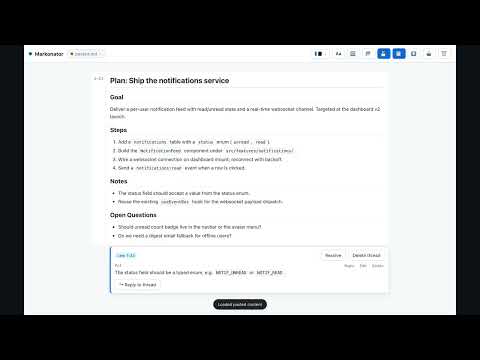
Markonator is a local-first Markdown reviewer for people who work with coding agents. Open any Markdown plan, skill, or spec, leave inline Markdown comments on exact lines or selected words, and save those comments back into the same `.md` file in a format any coding agent can read and act on. One click copies a ready-to-paste prompt that tells your agent exactly where every comment is and what to do with it. It runs entirely in your browser. No server, no account, no telemetry. Your documents never leave your machine. ### Why Markonator Coding agents ship plans and skills as Markdown. Reviewing them today means either describing changes in chat (the agent guesses where they apply) or rewriting the file yourself (which defeats having an agent). Markonator gives you a third option: comment on the exact line or word, in Markdown, then hand the agent a structured map of every thread to address. The agent reads the comments in place, refines the plan, and strips the markup. The review loop closes without you rewriting anything. ### How it works - Open a `.md` file (file picker, drag-and-drop, or paste). - Read it as a rendered page with a line-numbered gutter. - Move your cursor over a block and click the floating "+" to comment on that block, or select exact words to comment on a selection (the selection is wrapped with an inline anchor). - Write comments in Markdown with a live HTML preview — e.g. "use `HELLO` or `WORLD`". - Reply on any comment to build a thread; edit or delete any comment; resolve or reopen threads. - Save writes the document back to the same file (in place, via the File System Access API) with comments embedded inline as invisible-but-machine-parseable `<!-- markonator: … -->` blocks, right next to the line they refer to. Auto-save optional. - Click "Copy agent prompt" to put a ready-to-paste prompt on your clipboard. It is context-aware: if you saved in place, it references the file path and the line range and tells the agent to open the file (no full content); if not yet saved, it includes the full commented document. Only unresolved threads are listed as "to address"; resolved ones are noted for cleanup. ### Agent-readable comments Comments are stored as HTML comments, so they are invisible to normal Markdown renderers but plain text to any tool that reads files. Threads sit immediately after the line they refer to, so reading top-to-bottom preserves context. No separate database, no sidecar file — the review state lives inside the document itself, so it survives version control, commits, and handoffs between reviewers (human or agent). ### Use cases - Review an agent's plan before it codes — catch the bad assumption on line 12 before it becomes 200 lines of code. - Review a skill or `SKILL.md` before trusting an agent to follow it. - Iterate over rounds: mark threads resolved as the agent addresses them; the next prompt lists only what's still open. - Multi-reviewer handoff: comments are just text in the file, so the next reviewer sees the full thread history. - Dock Markonator in the Chrome side panel to review a document beside your editor or agent workspace. ### Privacy and offline Markonator collects no data. There is no server, no analytics, no advertising. All state is stored locally in your browser (IndexedDB for the document and comments; localStorage for your theme, font, and auto-save preferences). The Markdown renderer, the HTML sanitizer, and all content fonts are bundled locally, so the extension works fully offline and makes zero network requests. The only permission it requests is `sidePanel`, used to open Markonator in the browser side panel. It does not read or modify any website you visit. ### Features - Inline, anchored comments on a whole line/block or on selected words. - Threaded replies; edit and delete any comment; resolve and reopen threads. - Markdown comments with a live HTML preview; XSS-safe sanitization. - Cursor-following "+" to add a comment; selection bubble to comment on exact text. - Save back to the same file in place (Chrome/Edge) or download (anywhere); auto-save toggle. - Context-aware "Copy agent prompt" — references the file + line range when saved in place, or includes the full document when not. - Six themes (Auto, Light, Dark, Nord, Solarized Dark, Dracula) and eight content fonts (System Sans, Serif, Mono, Rounded, Inter, Lora, JetBrains Mono, Atkinson Hyperlegible) — all bundled for offline use. - Responsive layout: side-by-side composer on desktop, Write/Preview tabs on mobile. - 100% local, offline, installable, and open source (MIT). Markonator turns a Markdown plan into a conversation with your coding agent — in the margins, where the comments belong.
0 out of 5No ratings
Details
- Version0.1.13
- UpdatedJuly 1, 2026
- Size358KiB
- LanguagesEnglish
- Developer
Email
jeygokul@gmail.com - Non-traderThis developer has not identified itself as a trader. For consumers in the European Union, please note that consumer rights do not apply to contracts between you and this developer.
Privacy

This developer declares that your data is
- Not being sold to third parties, outside of the approved use cases
- Not being used or transferred for purposes that are unrelated to the item's core functionality
- Not being used or transferred to determine creditworthiness or for lending purposes