

Markion – Bookmark Manager

Overview
Find, organize and safely clean up your bookmarks.
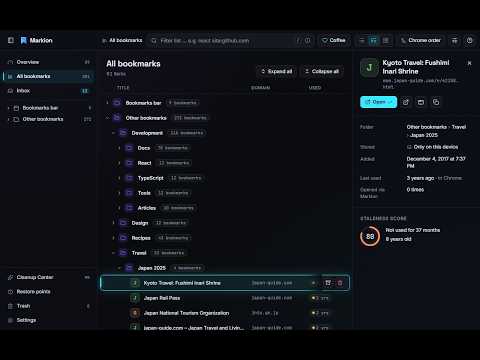
Markion replaces Chrome's bookmark manager with a fast, keyboard-first workspace for collections of any size, from a few hundred bookmarks to 20,000 and more. Everything runs locally: no account, no server, no tracking. WHY MARKION I tried the bookmark managers out there and kept hitting the same walls: slow with large collections, cluttered, or hard to trust with my data. Some cost money, others route everything through their own servers. So I built the one I wanted myself and set out to make it the best free bookmark manager I could. No hidden network requests, no data collection, no catch. FIND IN A HEARTBEAT • Command palette (Ctrl+K): type three letters, press Enter, done. • Straight from Chrome's address bar: "m", space, your search, Enter. • Frequent searches as saved searches in the sidebar, one key away with G 1 to G 9. • Typo-tolerant search with filters such as site:github.com, in:Recipes, is:dup, is:never or used:>1y. • List, tree and cards, sorting by last use, a detail panel and website icons from Chrome's cache. • Simple mode with larger text and only the main buttons, expert mode with everything; text size in three steps. • 18 themes, dark and light, from Dark Side to Synthwave and the retro terminals Green CRT and Amber CRT, all with checked contrast. REORGANIZE WITHOUT FRICTION • Save a page with one click on the icon (or Alt+Shift+B): Markion suggests the three best folders and tells you if the page is already saved. • Drag and drop, multi-select, cut and paste, move with M, all with undo. • Sort folders permanently, merge or dissolve folders, pin what matters. • Every action has a shortcut; the context menu keeps related actions in short submenus. • Jumped from the Cleanup Center into a folder? Back (Alt+←) takes you right where you were. CLEAN UP WITHOUT LOSING ANYTHING • The Cleanup Center finds bookmarks you no longer use, never-opened ones, duplicates and similar URLs, and explains why. • Review card by card: keep, archive or move to trash with one key or one click. • Nothing is lost: trash for 30 days, undo across restarts, automatic restore points before large changes. • Full backup: export everything, including Markion's own data, and import it 1:1 on another computer. • Bookmarks in your bookmarks bar, pinned folders and managed bookmarks are never suggested. • Optional link check for dead links and redirects, only after you turn it on. KEEP IT IN ORDER • The inbox collects bookmarks lying loose in "Other bookmarks"; file them or mark them "stays here". • The sorting assistant suggests the right folder with the reason, computed on your device. • The overview in the Cleanup Center shows an order score and all your domains at a glance. PRIVATE BY DESIGN • No account, no analytics, no ads, no developer servers. • No network requests at all unless you enable the optional link check. • Works with account and device bookmarks side by side. Markion opens instead of chrome://bookmarks, with Ctrl+Shift+O, or with Alt+B. To go back to Chrome's own manager, disable or remove the extension. Markion is free. If it saves you time, you can support its development with the Coffee button at the top or in Settings → About Markion. ### Markion 1.5.1 **Find first, save on demand** - The Markion icon in Chrome's toolbar (or Alt+Shift+B) now opens search and your bookmark tree. Type to search, or click through folders and subfolders; click a bookmark to open it, Ctrl+click or middle click to open it in the background. The window remembers which folders you left open. - If the current page is already a bookmark, the tree shows it highlighted and the button at the top reads "Saved". - To save the current page, click Save at the top or press Alt+S. The save screen works as before: title, address, the three best folders, any other folder, or the inbox. Esc goes back to the search. - Search results now show the folder of each bookmark.
0 out of 5No ratings
Details
- Version1.5.1
- UpdatedNovember 3, 2026
- Offered bysgraf12
- Size790KiB
- Languages2 languages
- Developer
Email
stevesoft@gmx.net - Non-traderThis developer has not identified itself as a trader. For consumers in the European Union, please note that consumer rights do not apply to contracts between you and this developer.
Privacy

This developer declares that your data is
- Not being sold to third parties, outside of the approved use cases
- Not being used or transferred for purposes that are unrelated to the item's core functionality
- Not being used or transferred to determine creditworthiness or for lending purposes
Support
For help with questions, suggestions, or problems, visit the developer's support site