

MarketPulseX - Crypto Futures Watchlist Sync

Overview
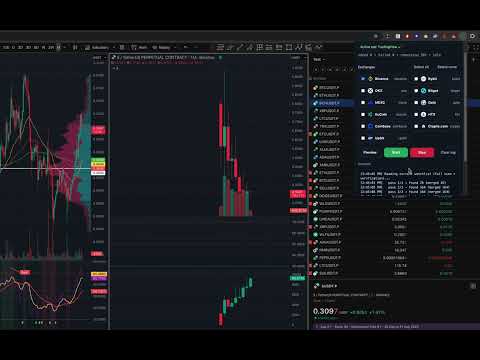
Help trader update watchlist TradingView with Exchanges USDT-M Perpetual Automatically
MarketPulseX keeps your TradingView watchlist up to date with USDT-M perpetual pairs from the exchanges you choose. What it does: Reads your current TradingView watchlist (locally in your browser) Loads symbols from top exchanges. Compares and adds only missing EXCHANGE:BASEUSDT.P symbols Optional Premium lists (curated categories) will be update later. Highlights: All-in-one popup: pick sources, preview, start/stop, live log No accounts or analytics; data stays on your device Permissions: activeTab + scripting: required to add symbols on the TradingView page Host access only for reading your public CSV Disclaimer: MarketPulseX is an unofficial tool. Trading involves risks. Use at your discretion.
0 out of 5No ratings
Details
- Version1.6.1
- UpdatedSeptember 16, 2025
- Size34.51KiB
- LanguagesEnglish (United States)
- Developer
Email
lhda.eth@gmail.com - Non-traderThis developer has not identified itself as a trader. For consumers in the European Union, please note that consumer rights do not apply to contracts between you and this developer.
Privacy

This developer declares that your data is
- Not being sold to third parties, outside of the approved use cases
- Not being used or transferred for purposes that are unrelated to the item's core functionality
- Not being used or transferred to determine creditworthiness or for lending purposes
Support
For help with questions, suggestions, or problems, visit the developer's support site