

MarkdownTrellis Clip

Overview
Paste Markdown, tidy it up, and copy it.
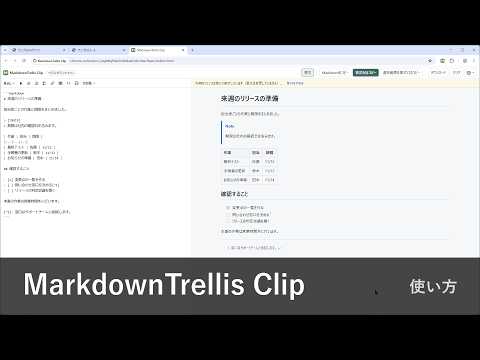
MarkdownTrellis Clip is a small workspace for Markdown you copied from an AI answer or anywhere else. Paste it, check the preview, fix it if needed, and copy it out as Markdown or as formatted text for Teams, email, and similar apps. How it works 1. Click the toolbar icon to open a work tab. 2. Press Ctrl+V. By default only plain text is taken in, so the formatting of the source page does not come along. 3. Check the preview next to the editor and make light edits. 4. Copy as Markdown, or Copy Formatted to paste with headings, lists, tables, and code kept. 5. Close the tab. What you entered is discarded. Features - GitHub Flavored Markdown: headings, emphasis, lists, task lists, tables, strikethrough, links, autolinks, code, quotes, horizontal rules - Formatting buttons: headings, bold, italic, strikethrough, lists, checklists, links, images, tables, inline code, code blocks, quotes, horizontal rules. One click is undone with one Ctrl+Z - Copy Formatted puts HTML with inline styles and matching plain text on the clipboard. Checkboxes become ☑ and ☐, details are expanded, and images become their alternative text - Copy Selection Formatted converts only the range you selected in the editor - Detects a code fence that wraps the whole answer and, if you choose, hides it in the preview and formatted copy without changing the source - Front matter is kept in the source and left out of the preview and formatted copy - Paste formatted text (off by default): turn it on in Paste settings, and formatted text copied from an AI answer or elsewhere comes in as Markdown headings, bold, lists, tables, links and code. Text without formatting and Markdown source are pasted as they are - Extra syntax you can turn on: alerts ([!NOTE]), footnotes, math shown as text, containers (:::), highlight (==text==), wiki links, definition lists - Download the editor text as a .md file - English and Japanese. Light and dark themes follow your system Privacy - Your text stays in the tab. It is not saved, and it is never sent anywhere. Reloading or closing the tab discards it - Only your settings are saved: the default on/off state of the extra syntax (only if you choose to save it) and whether to paste formatted text - Images and external resources are not loaded. Links open only when you click them - No content scripts, no access to websites, no analytics This extension is open-source software released under the MIT License. Its source code is available on GitHub.
0 out of 5No ratings
Details
- Version1.2.0
- UpdatedNovember 12, 2026
- Offered byja1bus
- Size109KiB
- Languages2 languages
- Developer
Email
ja1bus@iwanaga.org - Non-traderThis developer has not identified itself as a trader. For consumers in the European Union, please note that consumer rights do not apply to contracts between you and this developer.
Privacy

This developer declares that your data is
- Not being sold to third parties, outside of the approved use cases
- Not being used or transferred for purposes that are unrelated to the item's core functionality
- Not being used or transferred to determine creditworthiness or for lending purposes