

Markdown Under

Overview
Renders local and web Markdown files: tables, math, diagrams, code highlighting, outline and live reload.
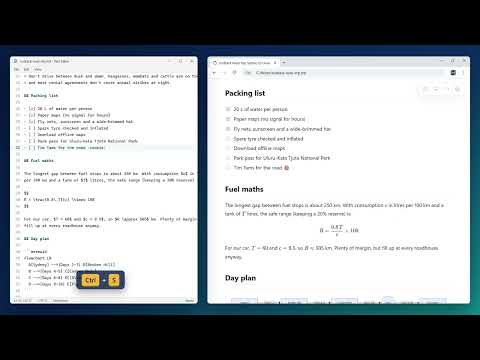
Markdown Under turns Markdown files into clean, readable pages, right inside Chrome. Open a README, your notes or any .md file and, instead of a wall of plain text, you get proper headings, tables, highlighted code, math and diagrams, with an outline of the document alongside. There is nothing to click, no account to create and nothing is uploaded. WHAT YOU GET • Tables, task lists, links, images and footnotes • GitHub-style alerts such as Note, Tip and Warning • Code highlighting for over 200 languages, with a copy button • Math typeset with KaTeX, and Mermaid diagrams • An outline sidebar that follows your scroll • Live reload: save a file in your editor and the page updates within a second • Light, dark or system theme, plus your choice of font, text size and page width • Print or save as PDF with a clean layout PRIVATE BY DESIGN No data is collected, there is no tracking, and your files never leave your computer. GETTING STARTED 1. Add Markdown Under to Chrome. 2. To read files on your computer, open chrome://extensions, click Details under Markdown Under and turn on "Allow access to file URLs". 3. Drag a .md file into Chrome. Click the toolbar icon to change settings. NEED AN EDITOR TOO? Markdown Under is also a free Windows desktop app with a side-by-side editor and a folder sidebar. It is free and open source: https://github.com/ContactEstablished/markdown-under
0 out of 5No ratings
Details
- Version0.1.0
- UpdatedOctober 27, 2026
- Offered bymatt@mattwilson.dev
- Size3.82MiB
- LanguagesEnglish
- DeveloperMatthew Wilson
506 Meadow Grass Ln Lexington, SC 29072-5602 USEmail
matt@mattwilson.dev - Non-traderThis developer has not identified itself as a trader. For consumers in the European Union, please note that consumer rights do not apply to contracts between you and this developer.
Privacy

This developer declares that your data is
- Not being sold to third parties, outside of the approved use cases
- Not being used or transferred for purposes that are unrelated to the item's core functionality
- Not being used or transferred to determine creditworthiness or for lending purposes