

Markdown Pro Max - Viewer & Editor

Overview
Render & edit Markdown: Mermaid diagrams, math, code highlighting, tables, outline, highlights, annotations, PDF/PNG/HTML export.
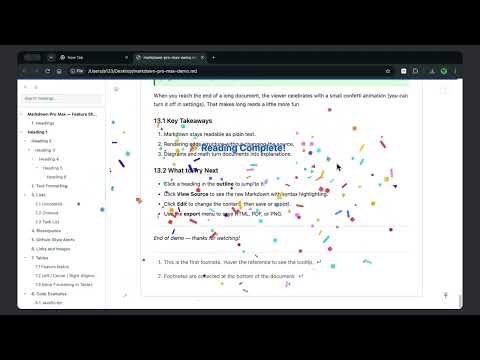
Markdown Pro Max is a capable, polished Markdown viewer and editor for Chrome: open a `.md` file and it renders instantly, with source editing, Mermaid diagrams, math formulas, tables, outline navigation, highlighting & annotation, and multi-format export. **How to Use:** - For local files, first enable "Allow access to file URLs" on the extension's details page (`chrome://extensions`); otherwise `.md` files won't render. - Just drag a `.md` / `.markdown` file into the browser window to open and render it — or open a local / online Markdown file from the browser. ## Feature List - Markdown rendering - Mermaid diagrams (flowcharts, sequence, Gantt, etc. with zoom & pan, gallery browse) - Code syntax highlighting (GitHub, Nord, Monokai, Dracula, Gruvbox) - Math formulas (KaTeX) - Image attribute syntax `{width=... height=...}` - Image click-to-zoom / gallery browse (prev/next through all images) - Table copy (Markdown / Excel / HTML) - Table column sorting - Theme switching (Light, Dark, Eye-comfort) - Mermaid theme (Follow Document / Default / Dark / Forest / Neutral / Base) - Adjustable page width (60%–100%) - Page border & shadow - Reading progress bar - Reading completion confetti - Word count - Outline sidebar (search, expand/collapse, draggable width) - [TOC] inline table of contents marker (auto-generate TOC from headings) - GitHub-style task lists (`- [ ]` / `- [x]` checkboxes) - Open links in new tab (configurable) - File annotations (pen, line, rectangle, circle, text, highlighter) - Source editing (edit / save to original file / save as / Markdown syntax help) - Export to PDF / PNG / HTML - Auto-refresh (auto-reload on file changes) - Local file support
5 out of 52 ratings
Details
- Version1.10.0
- UpdatedOctober 19, 2026
- FeaturesOffers in-app purchases
- Size1.56MiB
- Languages2 languages
- DeveloperWebsite
Email
lyuangg@gmail.com - Non-traderThis developer has not identified itself as a trader. For consumers in the European Union, please note that consumer rights do not apply to contracts between you and this developer.
Privacy

This developer declares that your data is
- Not being sold to third parties, outside of the approved use cases
- Not being used or transferred for purposes that are unrelated to the item's core functionality
- Not being used or transferred to determine creditworthiness or for lending purposes