

Markdown Leader
8 ratings
)
Overview
Review AI-written Markdown locally. Browse and search documents, then save checklist changes and notes in the original files.
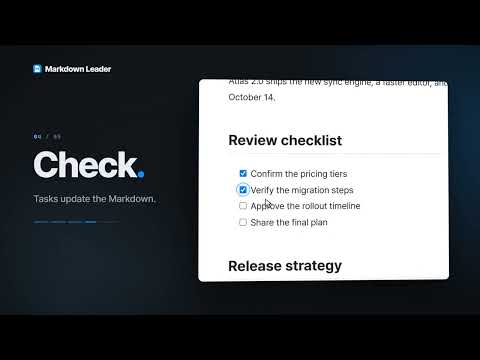
Markdown Leader is a local Markdown reader for Chrome. Browse a folder, find what you need, and keep the documents you return to close at hand. WHAT’S NEW IN 1.9.0 • Relative links in a document you opened with Open file, or in a file you dropped, now open in a new tab. They open right away when a folder you opened before contains both documents; otherwise connect the folder once or choose the file. On Windows the dialog copies the link’s relative location so you can paste it into the picker and press Enter. • Documents opened directly in Chrome from a file URL (double-clicked or dropped on the tab strip) save directly after you connect the original once. Connect a folder to save every document inside it; the connect dialog copies the location so you can paste it into the picker. • The location is also copied before the picker opens when you reconnect a document opened from a file URL, or when a file:/// link in a document points outside what you opened. Paste it into the picker and press Enter. • Shortcuts use Alt (macOS: Option) plus a letter and now work on macOS. The guide’s Shortcuts tab shows the right key for your system. • If a note has unsaved changes, the reader asks whether to save it before you open another note or close the document tab or browser tab. READ AND NAVIGATE • Browse Markdown files and folders, sort them by name or last modified time, and search a folder or the open document. • Open several documents in tabs. Reorder tabs, pin important documents, save favorites, and reopen recent files or folders from one combined list. • Drag the edge of the file explorer to give long file names more room. The reader remembers the width you choose. • Read code with syntax highlighting, tables, MathJax-based TeX and LaTeX equations, Mermaid diagrams, alerts, footnotes, definition lists, emoji, highlights, and superscript or subscript text. • Display DOCX/XML-converted tables and allow-listed raw HTML; unlisted tags, attributes, and unsafe URLs are removed. • Choose a light, dark, or system theme, then adjust the font, font size, line spacing, reading width, code-block style, highlight color, and accent color. • Preview a document as A4 pages and use Chrome’s Save as PDF option with the guided print settings. • After an update, review a concise summary once or reopen What’s new from Settings. Use the Markdown syntax guide above Settings whenever you need the supported inline rules. STAY CONNECTED TO YOUR FILES The active document can refresh when it changes outside the reader. If a file has moved, been removed, or cannot be accessed, the reader keeps the last document on screen, stops repeated refresh attempts, and lets you reconnect it or remove only its saved list entry. Reconnecting a file or folder keeps its open tabs, pins, favorites, and recent-entry relationship when the selected replacement is valid. REVIEW IN THE ORIGINAL FILE Reading alone does not modify your documents. Clicking a checklist checkbox changes its Markdown task marker. Adding or removing a highlight or underline, and saving, editing, or deleting a note, update the original Markdown file after you allow write access. Select text and release the mouse to add a note. Notes appear in a right-hand panel that moves the document aside, and numbered markers identify their locations. Notes, quoted text, and nearby context are stored in a comment at the end of the document, so they travel with the file when you share it. They are hidden from normal reading views, not encrypted or private to this extension. This feature does not send requests to an AI service. If the file has changed since it was loaded, the reader stops the save when it detects the conflict. For a document opened directly through a file URL, connect the original file or its folder once before saving; the reader remembers the connection. Check the displayed path when you choose: Chrome does not expose the selected file’s full path for the extension to verify. Open files or folders through the reader to skip this step. MATH AND LOCAL RESOURCES Math expressions support `$...$`, `$$...$$`, `\(...\)`, `\[...\]`, AMS multi-line environments, equation numbers, labels, and references. Relative images in Markdown are supported. Math expressions cannot load extensions, HTML, external links, or images; these are blocked to keep local documents offline and prevent untrusted content from changing the page or contacting external services. GET STARTED 1. Click the extension icon and open the reader. 2. Choose Open folder or Open file, then select a Markdown document. 3. To open local files directly in Chrome or by dragging them into Chrome, enable “Allow access to file URLs” on the extension’s Details page. PRIVACY AND PERMISSIONS Document rendering happens on your device. Reading settings, recent entries, favorites, update-display state, and file or folder access references are stored locally in Chrome for reopening. The extension has no developer-operated upload service, analytics, advertising, or AI integration. Images referenced by a document can request data from their external image servers, and external links open their destinations when clicked. Send feedback opens a Google Form only when you choose it; what you submit is handled by Google Forms. The extension does not upload the Markdown document or your notes to a developer server. Desktop Chrome 121 or later is required. UTF-8 files are supported for saving. MDX files are read as Markdown; embedded JSX is not executed. General text editing, cloud sync, and session restoration are not included. Support: bohe76@gmail.com
5 out of 58 ratings
Details
- Version1.9.0
- UpdatedOctober 19, 2026
- Offered bybohe76
- Size5.18MiB
- Languages2 languages
- Developer
Email
bohe76@gmail.com - Non-traderThis developer has not identified itself as a trader. For consumers in the European Union, please note that consumer rights do not apply to contracts between you and this developer.
Privacy

Markdown Leader has disclosed the following information regarding the collection and usage of your data. More detailed information can be found in the developer's privacy policy.
Markdown Leader handles the following:
This developer declares that your data is
- Not being sold to third parties, outside of the approved use cases
- Not being used or transferred for purposes that are unrelated to the item's core functionality
- Not being used or transferred to determine creditworthiness or for lending purposes