

Markback – Timestamp Bookmarks for YouTube™

Overview
Bookmark moments in YouTube videos and Shorts, add notes, and jump back to them in one click.
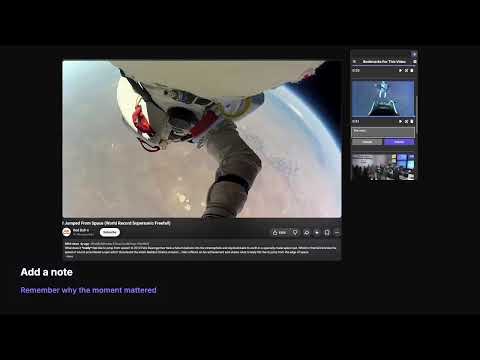
Markback lets you save the best moments of any YouTube video or Short and jump right back to them. Click the bookmark button in the YouTube player to save the current timestamp. Open the extension to see every bookmark for the video you're watching, then play from any of them with one click. FEATURES • Bookmark any moment in YouTube videos and Shorts with one click. • Add a note to each bookmark. • See a preview frame of the video at each bookmark. • A progress bar shows how close the video is to your next bookmark. • Optionally split the video into parts at your bookmarks, shown in the player's time display. • See every video you've bookmarked, sorted by most recently updated or by number of bookmarks. • Export all your bookmarks to a file and import them again on another computer. • Works with the keyboard and screen readers. PRIVACY Your bookmarks are saved in your own Chrome storage and synced with your Chrome profile. Nothing is collected or sent to anyone else. This extension is not affiliated with or endorsed by YouTube or Google.
0 out of 5No ratings
Details
- Version1.0.0
- UpdatedNovember 17, 2026
- Offered byCurlos
- Size43.18KiB
- LanguagesEnglish (United States)
- Developer
Email
curlosmart@gmail.com - Non-traderThis developer has not identified itself as a trader. For consumers in the European Union, please note that consumer rights do not apply to contracts between you and this developer.
Privacy

This developer declares that your data is
- Not being sold to third parties, outside of the approved use cases
- Not being used or transferred for purposes that are unrelated to the item's core functionality
- Not being used or transferred to determine creditworthiness or for lending purposes
Support
For help with questions, suggestions, or problems, visit the developer's support site