

Mark My Words - Highlighting and translating words on any page.
1 rating
)
Overview
Select any text to translate and save it.
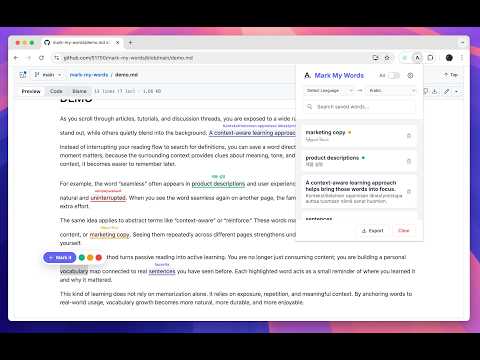
Turn the entire web into your personal vocabulary notebook 📖 This Chrome extension helps you learn languages naturally while browsing. Translate, highlight, organize, and review new words directly in context — without interrupting your reading flow. Core Features 🚀 Contextual Highlighting Select any word or phrase to translate and save it. The extension automatically highlights it on the current page and on any future pages where it appears. Inline Translation Hover over highlighted words to instantly view translations. No need to switch tabs. Multi-Color Organization 🎨 Choose from a customizable color palette when marking words. Organize vocabulary by topic, difficulty, exam prep, or any system you prefer. Flexible Site Control 🔒 Disable the extension on specific websites directly from the popup. Enable Allowlist Mode to keep the extension disabled everywhere by default and activate it only on selected sites. Smart Word Management 🧠 Quick Editing Click the translation label to modify it instantly. Word Action Bubble Click a highlighted word to open a floating action bubble where you can delete, recolor, or play pronunciation audio. Translation Options 🌍 Auto-Translate Mode Automatically translate selected text using Google Translate API. Manual Mode ✍️ Prefer custom definitions? Turn off auto-translate and enter your own translations. Language Selection Choose both source and target languages, with source language auto-detection available. Pronunciation Audio 🔊 Pronunciation first uses the Free Dictionary API audio endpoint, then falls back to browser speech synthesis if needed. Organization and Customization ⚙️ Centralized Settings Page Customize the extension theme color and default highlights. Manage your color palette. Toggle auto-translate on or off. Use Factory Reset to restore default settings (your saved vocabulary is preserved). Access built-in Quick Tips for guidance. Vocabulary Management 📚 Flexible Filtering Switch between viewing words saved on the Current Page or your Entire History. Source Linking Click the source link to jump back to the exact page where you originally saved a word. Search Quickly find specific words in your vocabulary list. Export 📤 Export your vocabulary list to CSV for use in Anki, Excel, or other study tools. Learn while you browse. Capture vocabulary in context, organize it your way, and build lasting language skills every day.
5 out of 51 rating
Details
- Version1.3.4
- UpdatedFebruary 19, 2026
- Size42.57KiB
- LanguagesEnglish
- Developer
Email
liestherub1@gmail.com - Non-traderThis developer has not identified itself as a trader. For consumers in the European Union, please note that consumer rights do not apply to contracts between you and this developer.
Privacy

This developer declares that your data is
- Not being sold to third parties, outside of the approved use cases
- Not being used or transferred for purposes that are unrelated to the item's core functionality
- Not being used or transferred to determine creditworthiness or for lending purposes
Support
For help with questions, suggestions, or problems, visit the developer's support site