

Marginalia — Study Notes & Highlights
1 rating
)
Overview
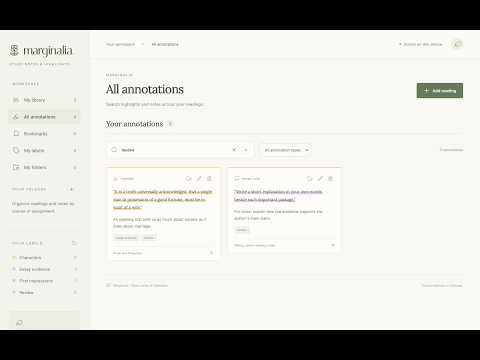
Highlight websites, PDFs, and EPUBs. Take reading notes, organize by course, and search your annotations.
Whether you need to complete reports, annotate a book for school, or organize articles for a big project, Marginalia will be there as your personal extension to store and label all of your annotations. Using highlight features, sticky notes, labels, folders, and anything else you could possibly need to successfully annotate your book, article, or website, Marginalia saves all of your annotations, making windows with three hundred tabs a thing of the past. We're always adding features and improvements depending on feedback, but here's what you can expect for now: - PDF/EPUB Uploads and Annotations - Have a book in the form of a PDF/EPUB that you want to annotate with your thoughts? No problem. Marginalia allows you to upload your own documents to the library. - Highlighters, sticky notes, margin notes, tabs, flags, underlines, and more - Annotations for websites, articles, and online books - Organization systems including folders, labels, and bookmarks - A search system that makes it easy to find exactly what you were looking for Marginalia can be used for help with research reports, book annotations, thought collection, or general note-taking. Whatever you use it for, we hope you have a happy annotation experience! Update 1.2.0: - Resize and drag around the annotation panel as needed. - Enjoy new callout, quote emphasis, sticker, strikethrough, and passage boxing features. - Enhanced display and customization of sticky notes and margin notes. - Distinct, stylized flags, bookmarks, and tabs.
5 out of 51 rating
Details
- Version1.2.0
- UpdatedSeptember 18, 2026
- Size2.96MiB
- LanguagesEnglish (United States)
- Developer
Email
sanah.s.rajesh@gmail.com - Non-traderThis developer has not identified itself as a trader. For consumers in the European Union, please note that consumer rights do not apply to contracts between you and this developer.
Privacy

Marginalia — Study Notes & Highlights has disclosed the following information regarding the collection and usage of your data. More detailed information can be found in the developer's privacy policy.
Marginalia — Study Notes & Highlights handles the following:
This developer declares that your data is
- Not being sold to third parties, outside of the approved use cases
- Not being used or transferred for purposes that are unrelated to the item's core functionality
- Not being used or transferred to determine creditworthiness or for lending purposes