


Overview
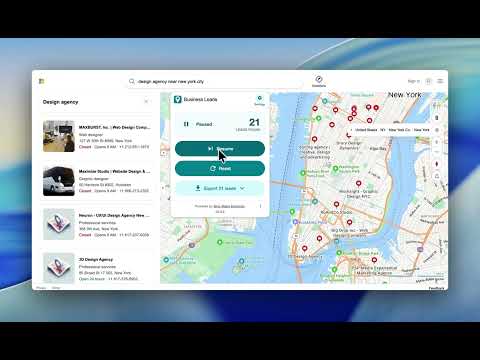
Maps Leads Extractor – Export Bing Maps Business Leads, Emails, Phones & Locations to CSV, Excel & JSON
🚀 Maps Leads Extractor for Bing Maps Find Business Leads Instantly with One Click 🔍 1. Powerful Bing Maps Lead Extractor Maps Leads Extractor helps you extract business leads directly from Bing Maps search results. With a single click, you can collect valuable business information from local businesses and companies worldwide. Perfect for lead generation, sales prospecting, market research, and business intelligence. 🌍 2. Extract Valuable Business Data Gather essential business information from Bing Maps listings, including: • 🏢 Business Name • 📍 Address • 📞 Phone Number • 🌐 Website URL • 📌 Geographic Coordinates • ⭐ Ratings • 🗂️ Business Categories • 🕒 Opening Hours • 🔗 Bing Maps URL • ➕ And much more! 📊 3. Export to CSV, Excel & JSON All extracted leads are automatically organized and saved to your device in structured formats, ready for analysis, CRM import, or outreach campaigns. Supported export formats: • 📁 CSV • 📁 JSON • 📁 XLSX (Excel) ⚡ 4. Fast & Easy Lead Generation Maps Leads Extractor scans Bing Maps search results and collects business information within seconds. No coding required. ✅ One-click extraction ✅ Fast processing ✅ Clean structured data ✅ Works worldwide 📈 5. Perfect for Sales, Marketing & Research Generate high-quality business leads for: • 🤝 B2B Sales Outreach • 📧 Cold Email Campaigns • 📞 Cold Calling • 📢 Marketing Campaigns • 🔍 Market Research • 🧠 Competitor Analysis • 🚀 Customer Acquisition 🧠 6. Smart Folder Organization Every export is automatically organized into folders, making it easy to manage, locate, and reuse your lead databases. 💎 7. Go Pro – Unlock Higher Limits Upgrade to Pro and get access to: • 🔓 Higher Monthly Export Limits • ⚡ Faster Processing • 🛠️ Priority Support Pricing is clearly displayed inside the extension. 🔐 8. Privacy You Can Trust Your data stays 100% on your device. 🛡️ All processing happens locally on your computer 🛡️ We do not collect, transmit, or store your extracted data 🛡️ Your business data remains private and secure ⚠️ Disclaimer Maps Leads Extractor is an independently developed software product and is not affiliated with, endorsed by, sponsored by, or associated with Bing Maps, Microsoft, or any of their subsidiaries or affiliates.
5 out of 51 rating
Details
- Version2.0.1
- UpdatedSeptember 23, 2026
- Size313KiB
- Languages14 languages
- DeveloperWebsite
Email
ricciflow.io@gmail.com - Non-traderThis developer has not identified itself as a trader. For consumers in the European Union, please note that consumer rights do not apply to contracts between you and this developer.
Privacy

Maps Leads Extractor has disclosed the following information regarding the collection and usage of your data. More detailed information can be found in the developer's privacy policy.
Maps Leads Extractor handles the following:
This developer declares that your data is
- Not being sold to third parties, outside of the approved use cases
- Not being used or transferred for purposes that are unrelated to the item's core functionality
- Not being used or transferred to determine creditworthiness or for lending purposes
Support
For help with questions, suggestions, or problems, visit the developer's support site