

MapGauge – GMB Audit, Categories & Local Rank Tracker

Overview
GMB audit for any Google Business Profile on Maps: 0–100 score, to-do list, GBP categories, reviews, competitors, local rank grid.
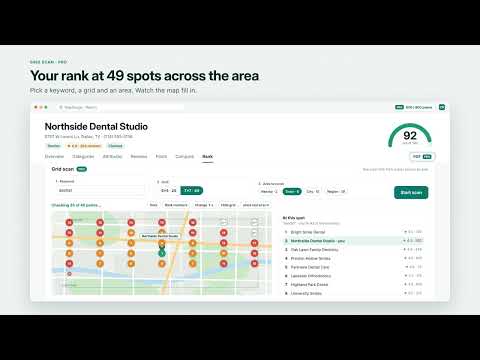
MapGauge is a free GMB audit tool for local SEO. Open any business on Google Maps and see how complete its Google Business Profile (GBP, formerly Google My Business) is, what to fix first, which categories it and its competitors use, and where it ranks across its area. • GMB audit: a 0–100 score and a to-do list, most important fixes first • GBP categories on Google Maps search results, plus a finder for all 4,081 Business Profile categories • Competitor compare: the business next to the top results of your search, and (with Pro) the categories they use that it doesn't • Local rank tracker: a free Rank log from your own searches, and a grid scan of an area on a map (one free 5×5 scan; 5×5 and 7×7 with Pro) • Review and post audits, schema markup, lead filters and branded PDF reports with Pro 𝗡𝗘𝗪 𝗜𝗡 𝟭.𝟯 • Grid scan: the business's rank at 25 or 49 points across an area, drawn on a map. A free account gets one 5×5 scan. • Is it going up? Each scan shows its change since your last scan. With Pro: a baseline, a trend chart with your own notes, before/after grids and a Rank section in the PDF. • Sign in with your email and a 6-digit code, no password. Only Grid scan and Restore Pro need an account. • Theme: System, Light or Dark, for every MapGauge page. 𝗛𝗢𝗪 𝗜𝗧 𝗪𝗢𝗥𝗞𝗦 1. Search Google Maps (for example "dentist in Toronto"). Each of the first 20 results gets a badge with its position, primary category, rating, reviews and photos. 2. Open a business. A slim MapGauge bar at the bottom of the business panel shows its quick score, the verdict (Good, Needs work or Weak), how many fixes it needs and where it ranks in your search. 3. Click Audit profile. The full report opens in a new tab, and each fix on the to-do list says where to change it in the Business Profile (for example: Edit profile → Hours). 𝗪𝗛𝗔𝗧 𝗧𝗛𝗘 𝗔𝗨𝗗𝗜𝗧 𝗖𝗛𝗘𝗖𝗞𝗦 (𝟭𝟭 𝗰𝗵𝗲𝗰𝗸𝘀) • Claimed: does an owner manage the profile? • Reviews: at least 10? Rating: 4.0 or higher? • Owner replies: are at least half of the reviews Google shows answered? • Posts: has the owner posted in the last 30 days? • Opening hours, website and phone number: are they listed? • Photos: at least 10? • Description: has the owner written one? • Categories: are there secondary categories for the business's other services? Hotels can't set opening hours or write their own description, so MapGauge skips those checks for them instead of marking them down. If Google's data can't be read in full, MapGauge says "Data may be incomplete" instead of showing a wrong number. 𝗧𝗛𝗘 𝗥𝗘𝗣𝗢𝗥𝗧 • Overview: score, to-do list, contact details, opening hours, the owner's description, and Place ID, CID and Knowledge Graph ID with copy buttons. With Pro, a Schema markup card with the business's LocalBusiness code, ready to copy • Categories: the primary category and 2 secondary ones, plus a finder that searches all 4,081 Business Profile categories • Attributes: accessibility, payments, parking and more, and whether the profile is claimed • Reviews: star breakdown, owner reply rate and the newest reviews Google loads with the business. Open the business's Reviews tab and scroll, and the Audit profile button counts the reviews you loaded • Posts: date of the last post, the post types and the button of each recent post • Rank: the Rank log and Grid scan (see "Local rank tracker" below) • Compare: the business next to the top 10 results of the Maps search you opened it from (the top 20 with Pro): score, rating, reviews, photos, categories, website, phone, hours, and where it is below its competitors. 3 compares a day on Free • PDF (Pro): the whole report on printable A4 pages, with your own logo, company name and contact line at the top Click the MapGauge icon in the toolbar to reopen your 10 most recent reports and see today's compares and saved reports (up to 50). 𝗕𝗔𝗗𝗚𝗘𝗦 𝗢𝗡 𝗚𝗢𝗢𝗚𝗟𝗘 𝗠𝗔𝗣𝗦 𝗥𝗘𝗦𝗨𝗟𝗧𝗦 Each of the first 20 results gets a badge: its position (#3; ads are not counted), primary category, rating, review count and photo count. Click "+N" to see the business's other categories. Sponsored results get a small badge marked "Ad". With Pro, each badge also shows the quick score, whether the business is claimed, and its website and phone. With Pro, "Filters" above the results finds businesses without a website or phone, unclaimed or without reviews, or Hot leads; matching results get a "Lead" mark, and "Show only matches" hides the other results while you look (the map pins stay). 𝗟𝗢𝗖𝗔𝗟 𝗥𝗔𝗡𝗞 𝗧𝗥𝗔𝗖𝗞𝗘𝗥 • Rank log (free): when you open a business from your Google Maps search, MapGauge notes where it was in the results. Switch on "Log this business in my searches" for up to 10 businesses to log every search you make. A Change column shows whether it went up or down since your last search with the same words. Saved in your browser only; MapGauge makes no searches for it. • Grid scan (sign in with your email): type a keyword and see the business's rank from 25 or 49 points across an area, from a neighbourhood (2 km) to a region (30 km), on a map. Click a point to see the top 20 businesses there, and see who outranks you at the most points. A free account gets one 5×5 scan (one per account, business and device; free scans may pause for a while when demand is high). Pro includes 800 points a month: a 5×5 scan uses 25, a 7×7 uses 49, and spots that fail give their points back. The searches run on MapGauge's own server. • Is it going up? Each scan shows its Top 3 share, average rank where found and area average, with their change since your last scan of the same settings, and a "Change ↑↓" map view. With Pro: set a baseline, follow the Top 3 share on a trend chart with your own dated notes, see before/after grids, and add a Rank section to the PDF report. 𝗢𝗡 𝗚𝗢𝗢𝗚𝗟𝗘 𝗦𝗘𝗔𝗥𝗖𝗛 The map box on a Google search, and its "More places" page, get badges too: position, primary category, rating and review count. Click a business and its panel gets an "Audit on Maps" button, which opens it on Google Maps for the full audit. 𝗠𝗔𝗣𝗚𝗔𝗨𝗚𝗘 𝗣𝗥𝗢: $𝟵.𝟵𝟵 𝗔 𝗠𝗢𝗡𝗧𝗛 𝗢𝗥 $𝟵𝟱.𝟴𝟴 𝗔 𝗬𝗘𝗔𝗥 Bought on Gumroad, with 800 Grid scan points a month on either plan. To turn Pro on, sign in with the email you bought Pro with, open Restore Pro in the account window and click "Look up my purchase", or enter the licence key from your Gumroad email (the purchase's email must match your account's). A licence key pasted on MapGauge's Pro licence page also unlocks the features that run in your browser. Pro unlocks: • every category of a business, on badges and in the report • badges for every result Google has loaded, with the quick score, claimed or unclaimed, website and phone, and "Load all", which scrolls the results list for you so Google loads more (up to 200 results; Stop ends it) • lead filters: website, phone, claimed or unclaimed, no reviews yet, and a "Hot lead" preset (unclaimed or no website, under 10 reviews) • category gaps: the categories 3 or more of your competitors use and you don't • unlimited compares, with the top 20 results of your search • branded PDF reports, ready to send to a client • the review audit: reviews per month, reply rate and median reply time, the rating of the newest reviews, and which reviews still have no reply (from the reviews you load, sorted by Newest) • the post audit: posts in the last 30 and 90 days, how often the owner posts and which buttons the posts use • Grid scan with 800 points a month, plus a baseline, the trend chart with notes, before/after grids and the Rank section in the PDF • schema markup: LocalBusiness structured data (JSON-LD) built from the profile, ready to paste into the business's own website Everything else is free. Only Grid scan and Restore Pro need an account. 𝗪𝗛𝗢 𝗜𝗧'𝗦 𝗙𝗢𝗥 Local SEO specialists, agencies and freelancers who audit Google Business Profiles for clients, and business owners who want to check their own listing. 𝗜𝗦 𝗜𝗧 𝗦𝗧𝗜𝗟𝗟 𝗥𝗘𝗔𝗗𝗜𝗡𝗚 𝗚𝗢𝗢𝗚𝗟𝗘 𝗠𝗔𝗣𝗦 𝗖𝗢𝗥𝗥𝗘𝗖𝗧𝗟𝗬? Google changes its pages from time to time. MapGauge's self-check page (toolbar popup → "Report a problem") shows which details were read as usual for the businesses you saw since Chrome started. "Report a problem" opens your own email app with MapGauge's version and the details that weren't read (no business names or searches), and you choose whether to send it. 𝗣𝗥𝗜𝗩𝗔𝗧𝗘 𝗕𝗬 𝗗𝗘𝗦𝗜𝗚𝗡 • Without an account or a Pro licence key, MapGauge sends nothing to any server. No analytics, no tracking. • It reads only what Google Maps or Google Search has already loaded for you. It makes no searches you didn't start and doesn't click for you. It scrolls Google's results list only when a Pro user clicks Load all, and stops on Stop. • Audits, saved reports and the Rank log are saved only in your browser and are deleted when you remove the extension. • An account uses your email address only to sign you in (the code is emailed through Resend) and to match a Pro purchase. MapGauge's server, on Cloudflare, keeps your account, your Grid scans (results 90 days, the three numbers 12 months), scan presets and your notes. • Grid scan sends your keyword, the business's map position and its Google IDs to MapGauge's server, which runs the searches through DataForSEO. • A licence key pasted on the Pro licence page is checked with Gumroad: your key and MapGauge's product ID, when you activate and at most once a day after. Chrome asks your permission first. Gumroad tells MapGauge's server about refunds and cancellations. The privacy policy lists everything MapGauge sends and keeps. MapGauge is not affiliated with, endorsed by or sponsored by Google. Google Maps is a trademark of Google LLC.
0 out of 5No ratings
Details
- Version1.3.0
- UpdatedNovember 24, 2026
- FeaturesOffers in-app purchases
- Offered bythemetim3@gmail.com
- Size1.4MiB
- LanguagesEnglish
- DeveloperMd Moklesur Rahamn
HOUSE 72,ROAD 4, MOWLANA VASHANI SARAK Jhenaidah 7300 BDEmail
moklesur42@gmail.comPhone
+880 1916-404543 - TraderThis developer has identified itself as a trader per the definition from the European Union and committed to only offer products or services that comply with EU laws.
Privacy

MapGauge – GMB Audit, Categories & Local Rank Tracker has disclosed the following information regarding the collection and usage of your data. More detailed information can be found in the developer's privacy policy.
MapGauge – GMB Audit, Categories & Local Rank Tracker handles the following:
This developer declares that your data is
- Not being sold to third parties, outside of the approved use cases
- Not being used or transferred for purposes that are unrelated to the item's core functionality
- Not being used or transferred to determine creditworthiness or for lending purposes