


Overview
Cybersecurity Network Mapping Tool
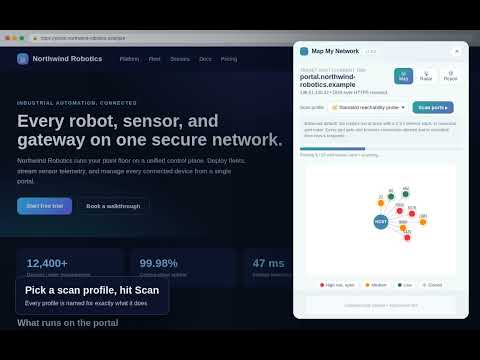
Map My Network lets you see your network the way an attacker sees it, allowing you and your cybersecurity team reduce the network attack surface. Map My Network is a browser-based network mapping and reconnaissance tool that turns the host behind the page you are on into a clear, visual picture. Instead of reading dry scan logs, you get a live port map, a sweeping radar, and a plain-language security report that shows exactly which doors on a machine are open to the world. The goal is simple: help you understand and reduce your network's attack surface area by making it easy to see what is exposed, why it matters, and how to close it. Networks are usually invisible and intimidating. Map My Network makes them tangible and even fun to explore, so that finding a forgotten open database or an unencrypted login port becomes something you can spot at a glance rather than something buried in a terminal. What it does For the host of your current tab, Map My Network probes a curated set of well-known ports (FTP, SSH, Telnet, SMTP, DNS, HTTP/HTTPS, SMB, RDP, VNC, MySQL, PostgreSQL, Redis, MongoDB, and more) and classifies each one as open, open/filtered, or closed based on connection behavior and timing. Every result is mapped to a friendly icon, a risk level, a plain-English explanation of the danger, and a concrete fix recommendation. Features Visual port map that renders the target's open and at-risk ports as an intuitive, color-coded picture. Radar sweep view where amber and red blips flag the ports that need attention. Security report with a per-port risk rating (Healthy / Caution / At Risk), a clear description of why each port is a concern, and a specific remediation step. Five scan profiles (Standard probe, Half-open probe, Decoy / source-obscured, Fragmented delivery, and Patient full sweep) that adjust probe timeout, concurrency, and ordering, each with an honest note explaining the real-world technique it is modeled on. Packet / request editing: open any port in a deeper console and craft the exact HTTP request sent to it. Edit the method, URL, headers, and body, send it, and read the raw response, so you can push the limits of testing every open port. A WebSocket console lets you connect and send and capture individual frames the same way. PNG snapshot and map recording so you can export and share what you found. Consent gate that requires you to confirm you have permission before any mapping begins. Benefits Reduce your attack surface area: quickly find the exposed services you did not know were open and get a direct fix for each one. Understand your network naturally: learn what every port and service means through visuals and plain language instead of jargon. Test thoroughly: hand-edit and replay requests against each open port to probe how services actually respond. Honest by design: the tool clearly states that, as a browser extension, it infers reachability from timing rather than forging raw packets, so you always know what the results mean. Free tool Map My Network is completely free to use. It is supported through affiliate links to cybersecurity-related partners, so you get the full tool at no cost.
0 out of 5No ratings
Details
- Version7.2.1
- UpdatedJuly 11, 2026
- Size41.83KiB
- LanguagesEnglish
- DeveloperWebsite
Email
yfrimer@gmail.com - Non-traderThis developer has not identified itself as a trader. For consumers in the European Union, please note that consumer rights do not apply to contracts between you and this developer.
Privacy

This developer declares that your data is
- Not being sold to third parties, outside of the approved use cases
- Not being used or transferred for purposes that are unrelated to the item's core functionality
- Not being used or transferred to determine creditworthiness or for lending purposes
Support
For help with questions, suggestions, or problems, please open this page on your desktop browser