

ManyNotesTab

Overview
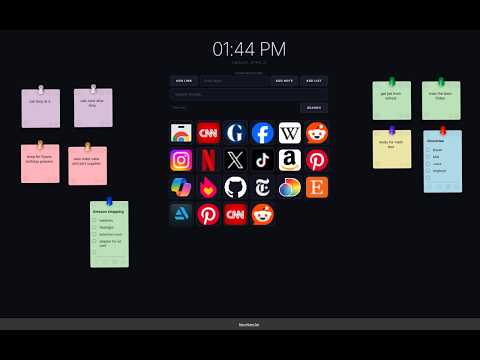
Customizable web links and draggable notes for quick reminders. It transforms the new tab into a personalized, productive space.
ManyNotesTab transforms your Chrome new tab into a personal command center — everything you need, every time you open a tab. What it does: Sticky notes & checklists — Create draggable, color-coded sticky notes and to-do lists directly on your new tab page. Format text, pin them anywhere, lock them so they can't be moved, and minimize them when not in use. (Default 8 notes and 2 lists) (unlimited in paid version) Bookmark tiles — Add your most-visited sites as visual bookmark tiles with icons. Organize them into named groups, drag to reorder, and control the grid layout to match your workflow. (Default 16 ) (unlimited in paid version) Reminders — Set due-date reminders on any note. Chrome will notify you with a desktop notification when the time comes, even if the tab isn't open. (Only in paid version) Google Search — Built-in search bar so you can search without navigating away from your notes. Clock widget — A clean, always-visible clock and date display. iPhone sync (Pro) — Pair your iPhone to view, add, edit, and delete notes and lists from your phone. Changes sync both ways in real time. Requires iOS 17.5+. (Only in Pro paid version) Custom backgrounds — Set a color or image as your new tab background. Multi-language — Available in English, French, Spanish, German, Norwegian, Japanese, Cantonese, and Canadian French. Why install it: Every time you open a new tab, you're one second away from your notes, your links, and your tasks — no app switching, no extra clicks. ManyNotesTab replaces the blank default page with a workspace that's actually yours. Your data stays local on your device and is scoped to your Google account, so nothing is shared across profiles.
0 out of 5No ratings
Details
- Version1.5
- UpdatedNovember 3, 2026
- FeaturesOffers in-app purchases
- Offered byiretreiver
- Size4.91MiB
- Languages6 languages
- DeveloperMental Giant Studio Inc.
77 Prestwick Ave SE Calgary, AB T2Z 3W7 CAEmail
mentalgiantstudio@gmail.comPhone
+1 403-852-9644 - TraderThis developer has identified itself as a trader per the definition from the European Union and committed to only offer products or services that comply with EU laws.
Privacy

ManyNotesTab has disclosed the following information regarding the collection and usage of your data. More detailed information can be found in the developer's privacy policy.
ManyNotesTab handles the following:
This developer declares that your data is
- Not being sold to third parties, outside of the approved use cases
- Not being used or transferred for purposes that are unrelated to the item's core functionality
- Not being used or transferred to determine creditworthiness or for lending purposes
Support
For help with questions, suggestions, or problems, visit the developer's support site