

manuXtractor 2.4.1
1 rating
)
Overview
Preview, export and analyse AI responses + citations from ChatGPT, Claude, and Google AIO/AI Mode.
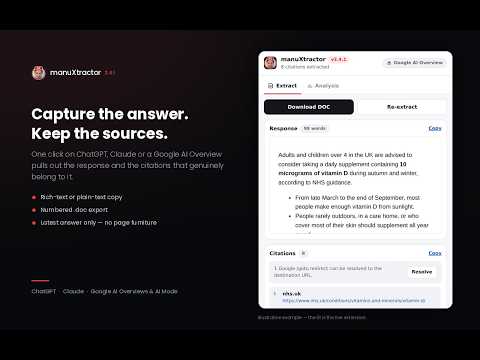
manuXtractor captures what an AI answer actually said — and which sources it actually used. Open ChatGPT, Claude, or a Google page showing an AI Overview or AI Mode answer, click the icon, and the response and its citations are pulled out ready to read, copy, export or analyse. Built for SEO, GEO and content teams who need to evidence what AI surfaces are saying, not screenshot it. WHAT IT DOES • Extracts the latest AI response with its formatting intact and previews it in the popup • Collects the genuine citations behind that answer — links inside the response, inline citation chips such as "GOV.UK +1", and the links revealed by the Sources popover or panel • Copies the response as rich text or plain text, and the citation list as clean URLs • Exports to a .doc file containing the platform, page URL, timestamp, the response and a numbered citation list • Analyses the answer for brand visibility, with figures and concrete recommendations WORKS ON • ChatGPT — current conversations and classic chat layouts • Claude • Google AI Overviews and Google AI Mode — google.com, .co.uk, .ie, .fr, .de, .it, .es, .nl, .ca and .com.au • Normal and Incognito windows (switch on "Allow in Incognito" on the extension's Details page) THE ANALYSIS TAB Enter a target brand, a target domain, or both — a domain on its own infers the brand — and manuXtractor reports: • Mentions of your brand, and your mention share against every other brand the answer names • Total citations, how many point at your domain, and your citation share • Prompt length, answer length, and how far into the answer your first mention lands • Overall sentiment, the sentiment of the sentences that mention you, and the query intent with a confidence score • The source mix behind the answer: official and government, academic, news, community and forums, comparison and listicle, reviews, retail, reference, and your own site • A cited-domain table showing citations and mentions side by side Underneath sit recommendations, grouped into Visibility, Citations & sources, Content & format, and Intent & messaging. They name the actual gap rather than generic advice: absent from the answer, mentioned but never cited, cited but never named, the citation gap against the leading domain, low salience, negative framing around your brand, or a cited page that does not match the intent of the question. Leave both fields empty for a market read of the answer instead: what is answered, how it is structured, the intent behind it, the tone, how concentrated the sources are, why the leading domains are winning, who holds the mentions, and where the opening is. NEW IN 2.4.0 • Google redirect resolution. Incognito and signed-out AI Overviews cite through opaque /goto and grounding redirects. Tokens are decoded offline first; when that is not possible, one click resolves the redirect to the real destination URL, which then flows through to the citation list, the DOC export and the analysis. • Incognito icon. In an Incognito window the toolbar icon wears sunglasses and carries a white "i" badge, so it is obvious which window an extraction came from. • The version is in the extension name and in the toolbar tooltip. • Platform detection now shows an icon before the label. • The Analysis tab described above. • A rebuilt popup: tabbed layout, KPI tiles, share meters, source-mix bars, and full light and dark themes. Also in recent releases: ChatGPT citation accuracy was fixed so that interface links — pricing, help, navigation and account URLs — are never exported as citations, and capture is restricted to the latest assistant turn. PRIVACY • Everything runs in your browser. The analysis is performed locally. There are no accounts, no servers, no analytics and no tracking. • Nothing you extract is transmitted anywhere. The only thing saved is the brand and domain you type into the Analysis tab, stored locally so you do not have to retype them. • Resolving a Google citation redirect is the single action that uses the network: it follows the redirect so the destination URL can be read. It runs only when you click Resolve, or afterwards if you granted the permission, and declining leaves the links working as redirects. GOOD TO KNOW Citation and mention counts are exact. Sentiment, intent and brand detection are pattern-based heuristics running on-device, so treat them as a fast read rather than a verdict. Google and AI product layouts change often; if an extraction looks wrong, use Re-extract before assuming a page is unsupported.
5 out of 51 rating
Details
- Version2.4.1
- UpdatedSeptember 18, 2026
- Offered byzeroduedsgn
- Size119KiB
- LanguagesEnglish (United Kingdom)
- Developer
Email
zeroduedsgn@gmail.com - Non-traderThis developer has not identified itself as a trader. For consumers in the European Union, please note that consumer rights do not apply to contracts between you and this developer.
Privacy

manuXtractor 2.4.1 has disclosed the following information regarding the collection and usage of your data. More detailed information can be found in the developer's privacy policy.
manuXtractor 2.4.1 handles the following:
This developer declares that your data is
- Not being sold to third parties, outside of the approved use cases
- Not being used or transferred for purposes that are unrelated to the item's core functionality
- Not being used or transferred to determine creditworthiness or for lending purposes