


總覽
Manga Reader
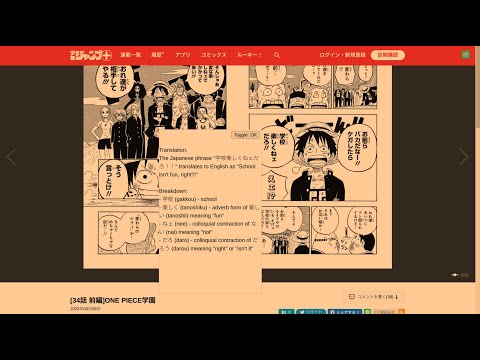
Join the discord at http://discord.veebee.fun to get updates on server status and new features or submit feedback and requests. Support me at https://www.patreon.com/MangaReader276 **What Does this Extension Offer?** This extension offers a unique approach to manga/manhwa/manhua translation and Japanese/Korean/Chinese learning: 1. **Side-by-side translation**: Unlike existing manga translation tools that simply replace Japanese text with English, this extension allows you to see the original Japanese text alongside the translated text. This feature provides a learning opportunity by enabling you to compare and understand the language in its original form. First click on the extension icon or use a keyboard shortcut to initiate cropping. Then crop the text bubble or the phrase to be translated. Feel free to toggle to see the original text to ensure that OCR (Optical Character Recognition) identifies the correct text to be translated. 2. **AI-powered Tutor**: While the extension offers conventional translation, it also provides the option to harness the power of a large language model. This cutting-edge feature breaks down sentences or phrases into easily digestible words or compound words, along with their translations. This approach enables a deeper understanding of the context and nuances within the text. 3. **Not just manga**: You can use this for manhwa and manhua as well since Korean and Chinese are also supported! You can also use this on other platforms like Youtube or Netflix subtitles! **Try it out yourself** 0. Pin the extension 1. Go to https://shonenjumpplus.com/episode/4856001361458138514 2. Right click the extension icon to open the options page from the menu 3. Sign in with google account 4. Feel free to change the other options 5. Go back to the manga 6. Click on the extension icon to start cropping. 7. Crop any text bubbles 8. (optional) switch between gpt/deepl on the options page. Choose the former if you want in depth translation. Choose the latter if you want a quicker translation 9. (optional) choose different capture modes that best suit your reading needs. Single is the most reliable at the moment. Multiple works best on large manga panels or an entire page. 10. (optional) switch between the supported languages on the options page. 11. (optional) enter you own GPT key for faster translations. The key is local to your browser and will not be uploaded to any servers. (This can be publicly verified in the client code.) **Important note** This is an early prototype. Depending on how many users find this idea useful, I will work on polishing it and adding new features. Please send me feature requests and bugs and I will do my best to fix them. Sometimes the first translation might take a while because the server restarts. Thanks for your patience!
3.5 分 (滿分 5 分)15 個評分
詳細資料
- 版本1.3.9
- 已更新2023年11月20日
- 提供者lyrian1995
- 大小1.08MiB
- 語言English (United States)
- 開發人員
電子郵件
lyrian1995@gmail.com - 非交易商這位開發人員並未表明自己是交易商。歐盟地區的消費者請注意,消費者權利不適用於你和這位開發人員之間簽訂的合約。
隱私權

這位開發者就你的資料做出下列聲明:
- 除經核准的用途外,不會將你的資料販售給第三方
- 不會基於與商品核心功能無關的目的,使用或轉移資料
- 不會為了確認信用度或基於貸款目的,使用或轉移資料
支援
如有疑問或建議,請前往開發人員的支援網站