

Mambo Break - Viral Meme Dance Overlay

Overview
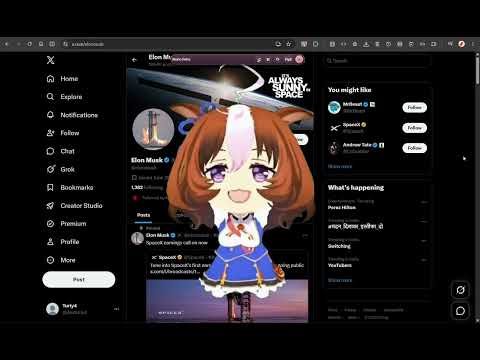
Bring the viral Mambo Oh Yeah meme dance to any webpage with a draggable anime overlay, focus timers, site breaks, and streaks.
💃 Bring the viral Mambo meme dance to every browser tab Love the Mambo Oh Yeah / Dudi Dudi Dam Dam dance seen across TikTok videos, Instagram Reels, YouTube Shorts, and meme edits? Mambo Break turns that playful anime meme energy into an interactive browser experience. With one click, place a transparent dancing character over almost any webpage for a funny mood boost, a quick screen break, or a more enjoyable focus session. The character appears as a clean on-page overlay not inside your social accounts. Drag it anywhere, change its size, play or pause the dance, replay it, mute the audio, or expand it to fill the tab. ✨ Key features 🕺 Viral anime dance overlay: Play a transparent Mambo-style meme character directly over the webpage you are viewing. ▶️ One-click playback: Open the extension and select Play Mambo to start the dance on your active Chrome tab. 📐 Four display sizes: Choose Small, Medium, Large, or Fullscreen for anything from a tiny desktop companion to a full-page meme takeover. 🖐️ Drag-and-drop positioning: Move the dancing character anywhere on the page without changing the website underneath it. 🎛️ Simple media controls: Pause, resume, replay, mute, resize, or close the animation whenever you want. ⏱️ Focus timer and site breaks: Add selected websites and schedule playful break reminders during long browsing, work, or study sessions. 🚫 Distraction blocker: Supporters can replace distracting pages with a full-screen dance break during focus time. 🔥 Daily streak tracker: Count completed dances and build a fun micro-break habit day by day. 🎵 Synchronized sound: Enjoy dance audio and lightweight original interface sound effects. 🔒 Private by design: No ads, analytics, page-content reading, or browsing-history tracking. 🎯 Perfect for Fans searching for the Mambo Oh Yeah meme or Dudi Dudi Dam Dam dance Anime meme and viral dance fans People who want a funny animated character on screen Students and remote workers who need quick browser breaks Anyone looking for a playful focus timer or website distraction blocker 🛠️ How it works Install Mambo Break and pin it to the Chrome toolbar. Open the extension, choose a dance, size, and sound preference. Select Play Mambo to place the character on the current webpage, or add selected sites to your break schedule. 🔐 Privacy first Mambo Break runs locally in Chrome. It does not read webpage text, forms, passwords, cookies, or messages. It does not record or sell browsing history and contains no advertising or analytics trackers. Your preferences, selected site list, timer totals, and dance streak stay in Chrome local storage on your device.
0 out of 5No ratings
Details
- Version1.0.2
- UpdatedAugust 10, 2026
- FeaturesOffers in-app purchases
- Offered byTuriy4
- Size81.86MiB
- LanguagesEnglish
- Developer
Email
turiy4support@gmail.com - Non-traderThis developer has not identified itself as a trader. For consumers in the European Union, please note that consumer rights do not apply to contracts between you and this developer.
Privacy

This developer declares that your data is
- Not being sold to third parties, outside of the approved use cases
- Not being used or transferred for purposes that are unrelated to the item's core functionality
- Not being used or transferred to determine creditworthiness or for lending purposes
Support
For help with questions, suggestions, or problems, please open this page on your desktop browser