


Overview
Free text expander with AI rewrite, encrypted cloud sync, and 25+ placeholders. Create shortcuts that expand instantly anywhere.
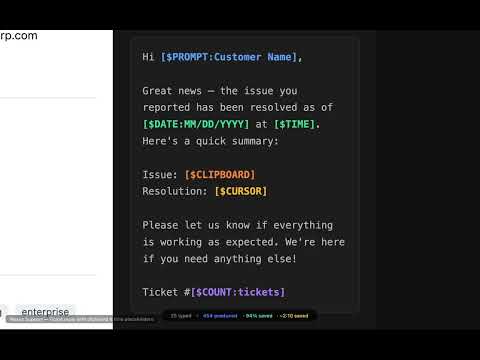
Makro — Free Text Expander with AI Rewrite & Encrypted Sync Stop retyping the same emails, replies, and templates. Makro lets you create text shortcuts (macros) that expand instantly when you type a hotword — on any website, in any text field. Type ".sig" and it becomes your full email signature. Type ".ty" and it becomes a polished thank-you reply. It's that simple. ━━━━━━━━━━━━━━━━━━━━ WHY MAKRO? ━━━━━━━━━━━━━━━━━━━━ ✅ Completely free — unlimited macros, categories, and usage. No account required. 🔒 Privacy-first — AES-256-GCM encryption protects all your data. Zero-knowledge architecture means even we can't read your macros. 🤖 AI-powered — Smart Rewrite rewrites any text: make it formal, casual, or shorter — or fix grammar. Runs locally with Ollama (free) or via Makro Cloud (Pro). ⚡ Works everywhere — Chrome, Edge, Firefox, and other Chromium browsers (Brave, Arc, etc.). Expands in any text field on any website — email, support tools, docs, chat, and more. ━━━━━━━━━━━━━━━━━━━━ HOW IT WORKS ━━━━━━━━━━━━━━━━━━━━ 1. Install Makro — add to Chrome, Edge, or Firefox. No account needed. A welcome page guides you through setup. 2. Refresh open tabs — Makro needs a page reload to work on tabs that were open before install. 3. Create your first macro — set a hotword (e.g., ".sig") and the text it expands to. 4. Type and expand — type the hotword on any website and watch it transform. ━━━━━━━━━━━━━━━━━━━━ FREE FEATURES ━━━━━━━━━━━━━━━━━━━━ 📝 Unlimited macros organized in categories and subcategories ⌨️ Hotword expansion — type a short trigger word, text expands automatically 🔤 25+ dynamic placeholders — dates, clipboard, cursor position, prompted input, calculations, form filling, and more ⭐ Favorites & tags — star important macros and add tags for quick filtering 🔑 Keyboard shortcuts — assign custom key combinations to any macro for instant expansion 📋 Clipboard history — never lose copied text again. Auto-clear wipes sensitive entries after a delay 📊 Usage statistics with heatmap and insights 🔍 Quick search popup (Ctrl+Shift+Space) to find and insert macros from any page 📁 Right-click context menu with folder structure ✍️ Markdown editor with live preview and formatting toolbar ☑️ Bulk operations — select, move, or delete multiple macros at once 🎨 Dark mode, light mode, and auto theme 🌐 Available in English, Spanish, German, French, Japanese, Portuguese, and Korean ⬇️ Import from TextExpander, Espanso, aText, AutoHotkey, PhraseExpress, Alfred, Typinator, ProKeys, Text Blaze, Auto Text Expander, and Beeftext 🔒 Spell check (uses your browser's built-in checker — text never leaves your device) ━━━━━━━━━━━━━━━━━━━━ PRO FEATURES ($2.99/mo) ━━━━━━━━━━━━━━━━━━━━ ☁️ Encrypted cloud sync across 2 devices 🤖 AI Smart Rewrite (100 rewrites/month) 🔍 Semantic search 📦 Shareable packs — export and share macro collections as portable packs 💾 Auto-backup (daily, weekly, or monthly) 📜 Version history for every macro ━━━━━━━━━━━━━━━━━━━━ PREMIUM FEATURES ($5.99/mo) ━━━━━━━━━━━━━━━━━━━━ ☁️ Cloud sync across 3 devices 🤖 10,000 AI rewrites/month ⭐ Priority support All paid plans include a 1-month free trial. ━━━━━━━━━━━━━━━━━━━━ COMPARE TO ALTERNATIVES ━━━━━━━━━━━━━━━━━━━━ Unlike TextExpander, PhraseExpress, or aText — Makro is free with unlimited macros. Unlike Briskine — Makro includes AI rewrite, encrypted sync, and 25+ placeholders. Switching? Import your existing snippets from TextExpander, Espanso, aText, AutoHotkey, PhraseExpress, Alfred, Typinator, ProKeys, Text Blaze, Auto Text Expander, or Beeftext. ━━━━━━━━━━━━━━━━━━━━ PRIVACY & SECURITY ━━━━━━━━━━━━━━━━━━━━ • Free tier: all data stays on your device, encrypted at rest. No ads, no third-party analytics • Cloud sync uses zero-knowledge encryption (AES-256-GCM) — your macros are encrypted client-side before transmission • Minimal telemetry: anonymous install ping (version, platform, locale) and anonymous weekly active-user count. No personal data collected. Optional anonymous uninstall feedback • Local AI Only mode keeps all AI processing on your device • Auto-clear clipboard wipes sensitive entries after a configurable delay • Privacy policy: makroexpander.com/privacy ━━━━━━━━━━━━━━━━━━━━ PERMISSIONS EXPLAINED ━━━━━━━━━━━━━━━━━━━━ • Content script (all URLs) — detects hotword typing in text fields and replaces with macro content. Only reads the focused input element; does not read page content or collect browsing data • storage — save your macros locally • clipboardRead/Write — clipboard history and [$CLIPBOARD] placeholder • activeTab — access the current page for macro expansion • contextMenus — right-click menu for quick macro access • alarms — scheduled auto-backup and sync timers • downloads — save backup files to your device • notifications — sync conflict alerts ━━━━━━━━━━━━━━━━━━━━ Questions? Visit makroexpander.com/contact or email support@makroexpander.com Feature requests? Vote and suggest ideas at feedback.makroexpander.com makroexpander.com
0 out of 5No ratings
Details
- Version0.9.10
- UpdatedMarch 9, 2026
- FeaturesOffers in-app purchases
- Size319KiB
- Languages7 languages
- DeveloperWebsite
Email
info@techhqusa.com - Non-traderThis developer has not identified itself as a trader. For consumers in the European Union, please note that consumer rights do not apply to contracts between you and this developer.
Privacy

Makro (Beta) — Text Expander: Free, Encrypted has disclosed the following information regarding the collection and usage of your data. More detailed information can be found in the developer's privacy policy.
Makro (Beta) — Text Expander: Free, Encrypted handles the following:
This developer declares that your data is
- Not being sold to third parties, outside of the approved use cases
- Not being used or transferred for purposes that are unrelated to the item's core functionality
- Not being used or transferred to determine creditworthiness or for lending purposes
Support
For help with questions, suggestions, or problems, please open this page on your desktop browser