


概要
Stay informed by monitoring available updates and non-MainWP changes. Connects to your MainWP Dashboard via REST API.
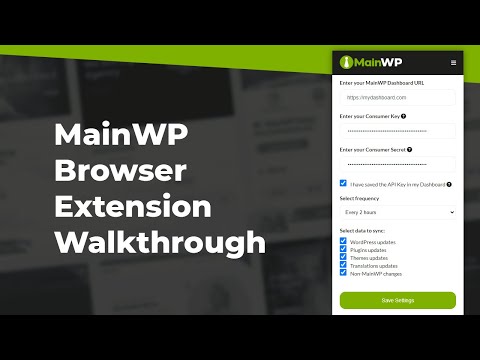
Do you often want to stay informed about the available updates without logging into your MainWP Dashboard? Look no further, this MainWP Chrome extension is designed to help you easily keep track of available updates across all your connected Child Sites, including changes to your plugins and themes status done outside your Dashboard. With this extension, you also gain the ability to control how often it retrieves updates from your MainWP Dashboard. You can choose intervals as short as 15 minutes or as long as once a day, giving you the flexibility to stay informed at your preferred frequency without logging into your MainWP Dashboard. ➤ Features Stay informed on WordPress core, plugins, themes, & translation updates Automatically fetch the number of available updates for all Child Sites Connect to the Time Tracker (MainWP Pro Feature) Easily set the updates check time-interval Manually fetch available updates count Track the number of changes made outside of your MainWP Dashboard Quickly jump into the desired Dashboard page to take action on updates Supports all Chromium-based browsers Easily connect using MainWP REST API ➤ How it Works Login to your MainWP Dashboard and navigate to the “REST API” menu from the left pane. Click “Add API Keys”. Make sure the “Enable REST API key” is toggled ON. Write “Description”, for example: “My Brower extension keys”. Install this extension, and click on the MainWP icon in your browser to open the settings for the extension. From your MainWP Dashboard REST API screen, copy “Consumer Key” and “Consumer Secret” and paste them on the extension. Hit “Save Settings” on your MainWP Dashboard, then click “Save Settings” on the extension. Voila! Your MainWP Dashboard is now connected to your extension. ➤ Support To understand better, take a look at our detailed guide: https://kb.mainwp.com/docs/mainwp-browser-extensions/ If you have any questions, feel free to post in our community forum: https://managers.mainwp.com/ ➤ Permissions The MainWP Chrome extension requests permission for alarms, storage, and notifications to store the update count and notify you when you start your browser. Rest assured, this extension does not collect any user data. ➤ Privacy Practices The MainWP Chrome extension does not collect any data. It just uses your generated MainWP REST API keys to connect to your MainWP Dashboard. However, by installing this extension, you agree to and acknowledge the following: https://mainwp.com/terms-of-service/ https://mainwp.com/privacy-policy/ Say goodbye to constantly monitoring your MainWP Dashboard. Our extension will promptly alert you, saving you valuable time while keeping you informed.
5 点満点で 38 件の評価
詳細
プライバシー

このデベロッパーは、お客様のデータについて以下を宣言しています
- 承認されている以外の用途で第三者に販売しないこと
- アイテムの中心機能と関係のない目的で使用または転送しないこと
- 信用力を判断する目的または融資目的で使用または転送しないこと
サポート
質問や提案、問題がある場合は、デベロッパーのサポートサイトにアクセスしてください。