


Overview
Email Extractor & Email ID harvester. Extract email IDs automatically from any webpage or PDF. MX validation & AutoVisit automation.
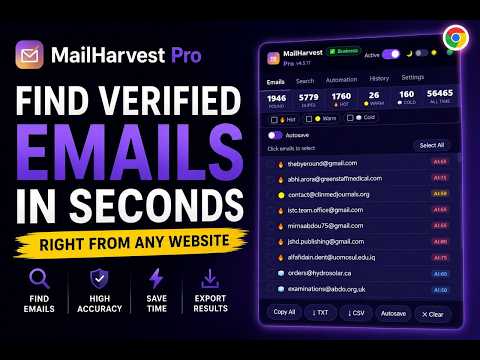
MailHarvest Pro. The powerful Email Extractor and Email ID harvester. Extract email IDs automatically, validate & score emails from any webpage or PDF. Stop copying emails by hand. Stop paying for expensive databases. MailHarvest Pro extracts, validates and scores every email address directly from the pages you visit — automatically, intelligently, and in seconds. 🔍 WHAT MAILHARVEST PRO DOES This Email Extractor plugin works on any webpage or Ajax page (like Google Search) you visit. Open a page, click the extension, and every email address is instantly extracted, deduplicated, validated against real mail servers, and scored by quality. No setup. No API keys. No subscriptions required. It also runs fully automated search campaigns across multiple search engines, letting you find hundreds of thousands of email addresses from any industry or country — while you sit back and watch. ⚡ KEY FEATURES 📧 SMART EMAIL EXTRACTION - Instant Email ID extraction from Source Code, HTML attributes, and raw HTML — finds hidden IDs not visible on the front end - Fetches email IDs directly from Source Code and Ajax pages (like Google Search), finding hidden IDs you can't see on the front end - Cloaked email decoding — finds emails hidden as [at], [dot] and obfuscation tricks - PDF, CSV, XLSX, TXT and Word document extraction — inline, no upload needed - CRM meta extraction — automatically captures first name, last name, company and source URL for every email - Two-phase saving — emails appear instantly while MX validation runs silently in background - Duplicate blocking — automatically removes duplicates across all sessions - 3,000+ disposable email domains blocked - Unicode escape blocking — eliminates false positives from encoded characters 🔥 HOT / WARM / COLD AI SCORING - 🔥 Hot — decision makers, C-suite, directors, VP-level contacts - 🟡 Warm — business contact addresses (info@, contact@, hello@, support@) - 🧊 Cold — all other validated addresses - AI predictive scoring — 0-100 confidence score per email - Select all emails of a specific score type with one click ✅ DUAL DNS MX VALIDATION - Verifies every email domain has real mail servers — zero bounces - Uses dual DNS-over-HTTPS providers for accuracy - Runs silently in background — never interrupts your workflow 🔍 SEARCH AUTOMATION - Automated search across multiple search engines and professional platforms simultaneously - 7 platform targeting modes — target the open web or narrow to specific social and professional networks automatically - Personal domain queries fired automatically per platform for maximum coverage - Pagination support — multiple pages per query automatically - 110+ country targeting — adds location context to every query - Bulk keyword support — paste one keyword per line and run them all in sequence - Silent CAPTCHA auto-solving — audio transcription solves CAPTCHAs automatically so search never stops - Search state persistence — resumes automatically if browser closes mid-search - 3 speed settings — Careful, Normal, Fast 🤖 AutoVisit & BULK URL AUTOMATION - Our AutoVisit feature allows you to process up to 1,000 URLs in a single automated run - Deep crawl — follows internal links up to 10 levels deep (up to 500 pages per domain) - File detection — automatically extracts from PDF, CSV, XLSX and DOC files encountered during crawl - Opens pages in background tabs without interrupting your browsing - Full pause, resume and stop controls - Session restore — picks up exactly where it left off 🔗 SPREADSHEET AUTOSAVE - Every extracted email syncs live to your spreadsheet the moment it's found - Color-coded rows — Hot/Warm/Cold highlighted automatically - Auto-filter and headers set up automatically - CRM-ready columns — Email, Score, AI Score, Domain, Source URL, Date 📊 CRM-READY CSV EXPORT - Exports First Name, Last Name, Email, Company, Source URL, Score, AI Score, Domain and Date - Drops straight into any CRM without cleanup 📊 LIVE STATS DASHBOARD - 6-box live counter: Found · Duplicates · Hot · Warm · Cold · All Time - Animated counters update in real time as emails are extracted 📋 SESSION HISTORY - Every page scan, automation run and search session logged automatically - Shows session type, timestamp and email count - Full email list accessible from history 🌍 7 LANGUAGES WITH FULL RTL SUPPORT - English, Español, Français, Português, Deutsch, Türkçe, العربية - Arabic switches the entire interface to right-to-left layout automatically 🎨 DARK AND LIGHT MODE - Full theme support with a single click — preference saved across sessions 🔒 PRIVACY FIRST - All processing happens locally in your browser — no data ever leaves your device - No account required. No tracking. No ads. - Only external calls: license verification, DNS validation, optional spreadsheet sync and CAPTCHA audio transcription — all from your own IP 👥 WHO IS THIS FOR? - An inexpensive alternative to Hunter, Snovio, and Email-Extractor.dev for sales professionals building targeted prospect lists - Recruiters — find candidate contact details from profiles, documents and directories - Digital marketers — grow email lists from niche websites and directories - Agencies — run bulk automation across 1,000 URLs with team seats - Business owners — research competitors and find partnership opportunities - Freelancers — find clients in any industry with keyword-powered search automation 🚀 HOW TO USE 1. Click the extension icon on any webpage 2. Emails are extracted instantly — scored and validated automatically 3. Use Search tab for automated keyword-based prospecting 4. Use Automation tab to process bulk URL lists 5. Export CRM-ready CSV or sync live to your spreadsheet 🔐 PERMISSIONS EXPLAINED activeTab — reads the current page to extract emails when you click the extension scripting — injects the extraction script into active pages during automation and search storage / unlimitedStorage — saves your emails, scores, session history and settings locally tabs — opens background tabs for automation, search and crawl features identity — used exclusively for optional spreadsheet OAuth connection downloads — detects downloadable files during automation for email extraction declarativeNetRequest — ensures search engines return maximum results per page alarms — keeps the background worker alive during long automation runs host permissions (all sites) — required because the extension must work on any website the user chooses to scan. It only activates when you explicitly trigger it — it never runs automatically, never collects data silently, and never transmits anything to our servers. Restricting to specific sites would make the core extraction feature non-functional by design. No permission is used to collect, transmit or share any of your data. Everything stays on your device. v4.5.17 — Maintenance Update Licensing: Resolved an issue where trial and license verification failed for existing users during the update process. Stability: Fixed a background script crash related to window property access. Compatibility: Improved Google Sheets authentication for Brave and Edge users. Security: Hardened device fingerprinting to ensure consistent identification across all installs. User Experience: Applied a patch to automatically refresh the extension after updates, ensuring fixes take effect immediately.
5 out of 56 ratings
Details
- Version4.5.17
- UpdatedJune 11, 2026
- Size484KiB
- LanguagesEnglish
- DeveloperWebsite
Email
mailharvest@zohomail.com - Non-traderThis developer has not identified itself as a trader. For consumers in the European Union, please note that consumer rights do not apply to contracts between you and this developer.
Privacy

This developer declares that your data is
- Not being sold to third parties, outside of the approved use cases
- Not being used or transferred for purposes that are unrelated to the item's core functionality
- Not being used or transferred to determine creditworthiness or for lending purposes
Support
For help with questions, suggestions, or problems, visit the developer's support site