

Mail2Action: Email Thread Summarizer & Visualizer for Gmail & Outlook

Overview
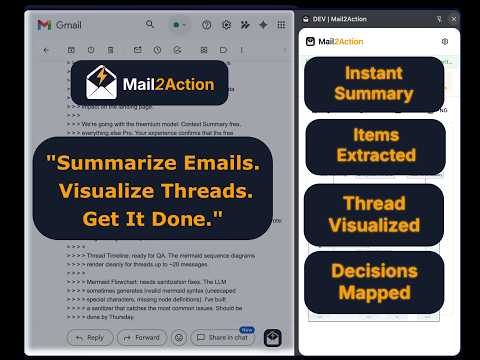
Summarize & visualize Gmail and Outlook threads: summary, action items, timeline, reply tree, flowchart. AI included, no API key.
Mail2Action turns a long email thread into something you can act on. Open a conversation in Gmail™ or Outlook on the web, click the icon, and get a side panel next to your inbox: an executive summary, action items, a timeline, a reply tree, and a decision flowchart. No pasting into a chatbot. No extra AI subscription required to start. Built for the thread you inherited, not the one you wrote. WHAT YOU GET • Executive summary: status, key decisions, open questions, and risks across the whole conversation. • Action items: tasks pulled from the thread, with owner and due date when the messages state them. Copy to clipboard, or export as CSV on Pro. • Thread timeline: who said what, and when. • Reply tree: who answered whom, where the discussion split, and which replies object, agree, or decide. • Decision flowchart: the choices behind the thread. Export as SVG or PNG on Pro. AI INCLUDED, OR BRING YOUR OWN KEY • Mail2Action AI works out of the box. No API key. No sign-up. • Need more runs, or a specific model? Connect your own key from OpenAI, Google Gemini, Anthropic Claude, or xAI Grok. You pay that provider directly. No markup. PRIVATE BY DESIGN • With Mail2Action AI, the open thread is processed only to create your result. It is not stored, not logged, and not used for model training. • With your own provider, email content goes from your browser straight to that provider. It does not pass through Mail2Action servers. FREE AND PRO • All five views are free, including copy to clipboard: 30 AI runs a month. • Pro raises that to 1,000 runs a month and adds export (CSV, SVG, PNG), billed monthly or yearly. • Using your own provider? Export is a one-time unlock instead of a subscription. HOW IT WORKS 1. Install Mail2Action. No account required. 2. Open any conversation in Gmail or Outlook on the web. 3. Click the Mail2Action icon and choose a view. Works in Chrome on Windows, macOS, Linux, and Chromebook. Made for project managers, consultants, team leads, and anyone who inherits a long email chain. Gmail is a trademark of Google LLC. Outlook is a trademark of Microsoft Corporation. Mail2Action is not affiliated with or endorsed by Google, Microsoft, OpenAI, Anthropic, or xAI.
0 out of 5No ratings
Details
- Version1.2.1
- UpdatedOctober 19, 2026
- FeaturesOffers in-app purchases
- Size6.39MiB
- LanguagesEnglish
- DeveloperKolmira UG (haftungsbeschränkt)Website
Weißenfelser Ring 8 Kornwestheim 70806 DEEmail
support@kolmira.comPhone
+49 175 8769563 - TraderThis developer has identified itself as a trader per the definition from the European Union and committed to only offer products or services that comply with EU laws.
- D-U-N-S316760976
Privacy

Mail2Action: Email Thread Summarizer & Visualizer for Gmail & Outlook has disclosed the following information regarding the collection and usage of your data. More detailed information can be found in the developer's privacy policy.
Mail2Action: Email Thread Summarizer & Visualizer for Gmail & Outlook handles the following:
This developer declares that your data is
- Not being sold to third parties, outside of the approved use cases
- Not being used or transferred for purposes that are unrelated to the item's core functionality
- Not being used or transferred to determine creditworthiness or for lending purposes
Support
For help with questions, suggestions, or problems, please open this page on your desktop browser