


Översikt
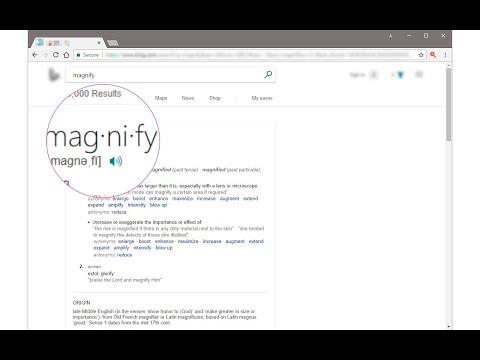
Press on the toolbar button to see the magnifying glass on the current page.
Magnifying Glass (Hover Zoom) is a lite addon that enables you to magnify a portion of a webpage with a click of a button. Please click on the toolbar button once to see the magnifying glass. Then move your mouse to see the magnified page within a circular section. If you want to hide the magnifier, simply click on the toolbar button once or click anywhere on the page. This addon has also an options page to adjust the magnifier zoom level and coverage area. Moreover, the toolbar button serves as an ON|OFF switch to turn the addon ON or OFF. Note 1: when you install the addon, it is turned off. Please click on the toolbar button once to activate the addon. The toolbar icon is red when the addon is active and grey when it is inactive. Note 2: if you want to change the zoom level, please visit the addon's options page. To report bugs, please fill out the bug report form on the addon's homepage (https://mybrowseraddon.com/magnifying-glass.html).
4,4 av 557 betyg
Information
- Version0.1.8
- Uppdaterat9 februari 2026
- Erbjudandet kommer frånYubi
- Storlek41.08KiB
- SpråkEnglish
- Utvecklare
E-post
muyu.biovie@gmail.com - Icke-näringsidkareUtvecklaren har inte angett att den är näringsidkare. Konsumenter i EU bör tänka på att konsumenträttigheter inte gäller för avtal mellan dig och denna utvecklare.
Integritet

Denna utvecklare försäkrar att din data
- inte säljs till tredje part, förutom i godkända användningsfall
- inte används eller överförs för ändamål som inte är relaterade till objektets huvudfunktioner
- inte används eller överförs i syfte att bedöma kreditvärdighet eller för lån.
Support
Om du behöver hjälp med frågor, förslag eller problem kan du besöka utvecklarens supportwebbplats