


Oversigt
Press on the toolbar button to see the magnifying glass on the current page.
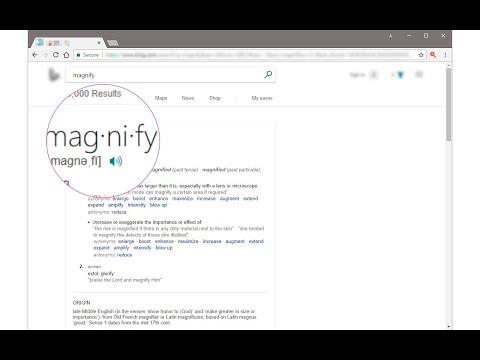
Magnifying Glass (Hover Zoom) is a lite addon that enables you to magnify a portion of a webpage with a click of a button. Please click on the toolbar button once to see the magnifying glass. Then move your mouse to see the magnified page within a circular section. If you want to hide the magnifier, simply click on the toolbar button once or click anywhere on the page. This addon has also an options page to adjust the magnifier zoom level and coverage area. Moreover, the toolbar button serves as an ON|OFF switch to turn the addon ON or OFF. Note 1: when you install the addon, it is turned off. Please click on the toolbar button once to activate the addon. The toolbar icon is red when the addon is active and grey when it is inactive. Note 2: if you want to change the zoom level, please visit the addon's options page. To report bugs, please fill out the bug report form on the addon's homepage (https://mybrowseraddon.com/magnifying-glass.html).
4,4 ud af 556 bedømmelser
Oplysninger
- Version0.1.8
- Opdateret9. februar 2026
- Udbydes afYubi
- Størrelse41.08KiB
- SprogEnglish
- Udvikler
Mail
muyu.biovie@gmail.com - Ikke forhandlerDenne udgiver har ikke angivet sig selv om forhandler. Hvis du er kunde i EU, skal du være opmærksom på, at forbrugerrettighederne ikke gælder for kontrakter, der indgås mellem dig og denne udgiver.
Privatliv

Denne udvikler bekræfter, at dine data:
- Ikke sælges til tredjeparter uden et godkendt anvendelsesformål
- Ikke anvendes eller overføres til formål, der ikke er relevante i forhold til elementets hovedformål
- Ikke anvendes eller overføres til at fastlægge kreditværdighed eller lånerelaterede formål
Support
Du kan få hjælp, hvis du har spørgsmål, forslag eller problemer, ved at gå til udviklerens supportwebsite