

Magic Tabs

Overview
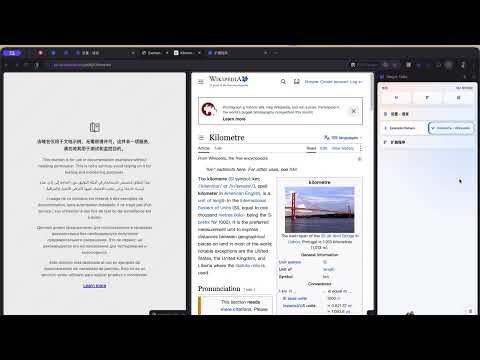
Drag one tab onto another in the side panel to create a native Chrome split view.
Magic Tabs Magic Tabs is a compact vertical tab manager built for Chrome’s side panel. It helps you organize open tabs, keep frequently used pages within reach, and create Chrome’s native split view with a simple drag-and-drop gesture. Drag one tab onto another to display both pages side by side. Drag either tab out of the split group to return to a normal layout. You can also rearrange tabs, switch the left and right positions of split tabs, or drag important tabs into the Favorites area. Features • Create Chrome native split views by dragging one tab onto another • Drag a tab out of a split group to end the split view • Switch the left and right positions of split tabs • Reorder individual tabs and split groups with drag-and-drop • Pin frequently used tabs to a compact Favorites area • Keep favorite shortcuts available after tabs are closed • Close open tabs directly from the side panel • Compact layout designed for managing many tabs • Automatic light and dark theme support • Customizable density, animations, favorite layout, and tab behavior • English, Simplified Chinese, and Traditional Chinese interfaces Magic Tabs requires Chrome 155 or later. Privacy Magic Tabs uses browser permissions only to manage tabs, tab groups, settings, and the Chrome side panel. Your Magic Tabs settings and favorite-tab records are stored locally in your browser. 中文说明 Magic Tabs 是一款运行在 Chrome 侧边栏中的紧凑型纵向标签管理工具。它可以帮助你整理当前窗口中已经打开的标签,将常用页面固定在顶部,并通过拖拽快速创建 Chrome 原生分屏。 把一个标签拖到另一个标签上,即可让两个页面左右并排显示。将分屏中的任意标签拖出组合区域,即可结束当前分屏。你还可以调整标签顺序、互换分屏标签的左右位置,或者把常用标签拖到顶部的常用区域。 主要功能 • 将一个标签拖到另一个标签上,创建 Chrome 原生分屏 • 将标签拖出分屏组合,快速结束分屏 • 拖动分屏标签,互换左右显示位置 • 拖拽调整单个标签和分屏组合的顺序 • 把常用标签固定到顶部的紧凑常用区域 • 标签关闭后仍可保留常用快捷入口 • 鼠标移入标签后,可直接关闭当前标签 • 紧凑的纵向布局,适合管理大量标签 • 自动适配浏览器的浅色和深色模式 • 可设置标签密度、动画效果、常用区布局和标签行为 • 支持英语、简体中文和繁体
0 out of 5No ratings
Details
- Version1.0.1
- UpdatedOctober 19, 2026
- Offered byjonas.chan
- Size49.29KiB
- Languages3 languages
- Developer
Email
349263349@qq.com - Non-traderThis developer has not identified itself as a trader. For consumers in the European Union, please note that consumer rights do not apply to contracts between you and this developer.
Privacy

Magic Tabs has disclosed the following information regarding the collection and usage of your data. More detailed information can be found in the developer's privacy policy.
Magic Tabs handles the following:
This developer declares that your data is
- Not being sold to third parties, outside of the approved use cases
- Not being used or transferred for purposes that are unrelated to the item's core functionality
- Not being used or transferred to determine creditworthiness or for lending purposes