

Magic Scraper – Lead & Web Scraper to Excel
3 ratings
)
Overview
Turn any web page into a spreadsheet: tables, lists, search results to CSV, Excel or JSON. Free, no account, runs in your browser.
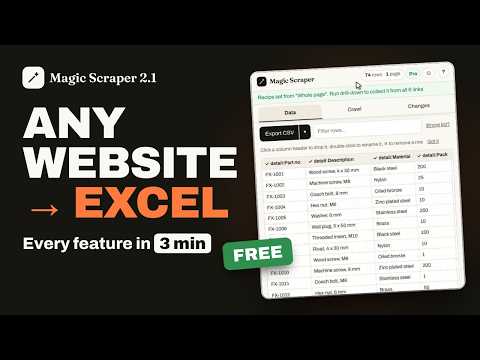
Magic Scraper turns any web page into a spreadsheet. Open it on a page with repeated data — product listings, directories, tables, search results or card grids — and it finds the rows and names the columns for you. When each row links to a page of its own, it says so and offers to collect that page's details too. Building a lead list? Business directories, chamber and association member lists and trade show exhibitor lists come out with every listing on every page — names, phones, emails and websites — with no credits and no per-lead limits. Export to CSV, Excel, JSON or your clipboard, or paste it into a new Google Sheet in one click. With Pro, send the rows straight into a Google Sheet in your own Google account, or to your own webhook: Zapier, Make, n8n or your own server. Pin it to the side panel and it stays open beside the page while you click, following the tab you're on — or open it in a window of its own. Magic Scraper can handle: * Tables, lists, directories and product grids, and lists split under headings (one table, with the heading as a column) * Pagination of every kind — Next links, arrows, page numbers, Load more buttons and infinite scroll — in more than 80 languages * The right list on a busy page: choose another table or point at the rows yourself, and it pages that list by its own pager * Manual selection when automatic detection isn't enough: click a row, shift-click anything else to add it as a column * Images, links, prices, badges, ratings and other page data * Reddit, Amazon search results, Hacker News, PubMed and arXiv read by name, with scores, authors, prices, ratings, DOIs and abstracts in clean columns * schema.org markup, web components (open shadow roots) and same-origin iframes * Multi-page scraping with randomized delays and rate-limit handling * One setup run over a whole list of pages, merged into one sheet * A "verify you're human" check stops the run and hands you the tab — it never tries to get past it Need more data from each result? Drill-Down opens the page behind every row and adds its fields to your spreadsheet as new columns, chained as many levels deep as the data is buried. When that page holds a table — price breaks, branches, a category's products — each of its rows can become a row of yours, every page of it. The free version drills the first 3 rows of a run, so you can see exactly what comes back on your own sites before paying for the rest. Everything runs locally in your browser. No account, no analytics, no telemetry, and your scraped data is never sent to our servers. It goes only where you send it: a file, your own Google Sheet, or your own webhook. Installing it opens a short welcome page on magicscraper.app, and removing it opens an optional one-question page asking why; the extension itself sends nothing to us. FREE Unlimited scraping, filtering, column editing, exports, and pagination with no page limit at all. Your setup for a site you have already scraped is remembered. Drill-Down on the first 3 rows of a run, and one setup over a list of pages for the first 2 addresses. A long crawl that dies with its tab is offered back the next time you open the extension on that site. PRO — a one-time purchase, no subscription and no account * Drill-Down on every row instead of the first 3 * Saved setups you can name, reuse on another site and export to hand to a colleague * Run one setup over a whole list of pages — every category, every town — merged into one sheet with a List column * Compare a run with the last one — a Changes tab showing what changed, what is gone and what is new * Compare with a file — your CRM export or last month's list; the rows marked new are the ones you don't have yet. The file is read on your computer and never uploaded * Run a saved setup on a schedule while your browser is open; a run missed while it was closed happens when you next open it * Send rows to a Google Sheet in your own account, or to your own webhook (Zapier, Make, n8n or your server) Practice on a sandbox built for it: https://magicscraper.app/demo Every job, step by step: https://magicscraper.app/how-to-use-magic-scraper Turn the page you're looking at into usable data in seconds.
5 out of 53 ratings
Details
- Version2.1.1
- UpdatedNovember 3, 2026
- FeaturesOffers in-app purchases
- Offered bylewisvillamor26
- Size346KiB
- LanguagesEnglish
- DeveloperLewis John Villamor
33 Road 4 Pildera 2 Pasay City, Metro Manila 1300 PHEmail
lewisvillamor26@gmail.comPhone
+63 977 097 5357 - TraderThis developer has identified itself as a trader per the definition from the European Union and committed to only offer products or services that comply with EU laws.
Privacy

Magic Scraper – Lead & Web Scraper to Excel has disclosed the following information regarding the collection and usage of your data. More detailed information can be found in the developer's privacy policy.
Magic Scraper – Lead & Web Scraper to Excel handles the following:
This developer declares that your data is
- Not being sold to third parties, outside of the approved use cases
- Not being used or transferred for purposes that are unrelated to the item's core functionality
- Not being used or transferred to determine creditworthiness or for lending purposes
Support
For help with questions, suggestions, or problems, please open this page on your desktop browser