

Magic Actions for YouTube™

Descripción general
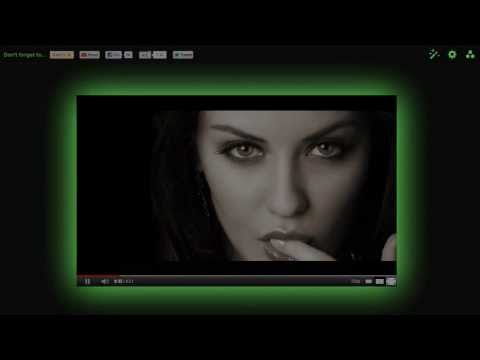
Enhance your YouTube watching experience! Cinema Mode, Mouse Wheel Volume Control, AutoHD, Expand, Snapshots …
Magic Actions for YouTube™ is a lightweight and useful extension designed for a more comfortable watching experience. Magic Actions is very easy to use! Magic Actions for YouTube™ - Key Features: ✔ AutoHD feature - start play all YouTube™ videos in HD. + Ultra HD 4k > HD1440p > HD1080p > HD720p > 480p > 360p > 240p > 144p ✔ Instant control over volume by scrolling mouse wheel! + OSD on-screen display. ✔ Cinema Mode - 1-click and the whole page is shaded. + make you feel as if you were in a movie theater! + click again to toggle back to the normal view. + over 20 predefined color themes. + your own custom colors. ✔ 1-click to take snapshot from playing video and save as PNG, JPEG or WEBP image format! ✔ Cool Day/Night toggle switch to browse YouTube in black or white. ✔ View and delete your watch history. ✔ Magic Vinyl and Multi-Range Looper. ✔ Enlarge avatars and video thumbnails on mouse over. ✔ Expand videos to full window size. ✔ Auto Wide - always play in wide player mode. ✔ Stop Auto-Play - manage whether or not the initial video will autoplay. + allow/deny preloading a video. + play a sound when loading complete. ✔ Replay - repeat, replay a video again and again. ✔ Hide Annotations - Don't show video annotations. ✔ Ability to hide comments, related videos, etc. ✔ Better Ads feature based on Better Ads Standards https://www.betterads.org By enabling this option, you can skip pre-roll and mid-roll ads by clicking the yellow "Magic Skip" button. For more information about this feature, please visit: https://www.chromeactions.com/better-video-experience.html ✔ AI-based helpful reminders. If enabled (recommended), analyzes your system, monitors and occasionally displays reminders about critical bug fixes, how they might impact your account security, and overall media performance (YouTube, etc.) . Please note that we do not store any private data about your system on the AI-server. You can show your appreciation and support future Magic Actions for YouTube™ development by donating via extension menu or at our website: https://www.chromeactions.com/contribute.html OFFICIAL WEBSITE: https://www.chromeactions.com/ UPDATES & RELEASES: https://www.chromeactions.com/news.html EXTENSIONS GALLERY: https://chrome.google.com/webstore/detail/abjcfabbhafbcdfjoecdgepllmpfceif PRIVACY POLICY: https://www.chromeactions.com/privacy-policy.html MAGIC ACTIONS - YOUTUBE CHANNEL: https://www.youtube.com/channel/UCCwIAJrwWGB2GCyZSp41wNg SOUNDCLOUD: https://soundcloud.com/jarmalis TWITTER: https://twitter.com/chromeactions FACEBOOK: https://www.facebook.com/magicactions CHANGES: Magic Actions has always been more than a simple ext...it's Magic! https://www.chromeactions.com/news.html v7.3 changes: Added several cool video filters: Milk, Noir, Oil painting, Pencil, Engraving, Age, Plastify, Colored Emboss, Soft Focus Lens and Matte. v.3.0 changes: ♥ Support embedded youtube videos on Facebook, Google Buzz... ♥ Ability to choose OSD type: + Line+Text + Text only + No indication ♥ Auto-hide video annotations feature ♥ Highly optimized, fast code, doesn't use any third-party library (like jQuery or MooTools) + Fixed Auto replay pre-buffering v.2.0 Added: ♥ Ability to set Auto HD quality + Highres! HD1080p HD720p 480p 360p 240p ♥ On/Off Mouse Wheel Volume Control ♥ Allow/Deny preloading/buffering a video on youtube.com + Code optimization
4.7 de 5128 k calificaciones
Detalles
- Versión7.9.5.6
- Fecha de actualización30 de octubre de 2025
- Tamaño170KiB
- IdiomasEnglish
- DesarrolladorSitio web
Correo electrónico
support@mixesoft.com - No comercianteEl desarrollador no se identificó como comerciante. Si eres un consumidor de la Unión Europea, ten en cuenta que los derechos de los consumidores no aplican a los contratos entre el desarrollador y tú.
Privacidad

Este desarrollador declara el siguiente tratamiento de tus datos:
- No se venden a terceros, excepto en los casos de uso aprobados
- No se utilizan ni transfieren para fines no relacionados con la funcionalidad principal del elemento
- No se utilizan ni transfieren para determinar tu solvencia ni ofrecer préstamos
Asistencia
Si tienes preguntas, sugerencias o problemas, visita el sitio de asistencia del desarrollador