


Overview
Click an Apex class, trigger, Flow, or LWC in Setup and get ranked best-practice findings. Read-only. Nothing leaves your browser.
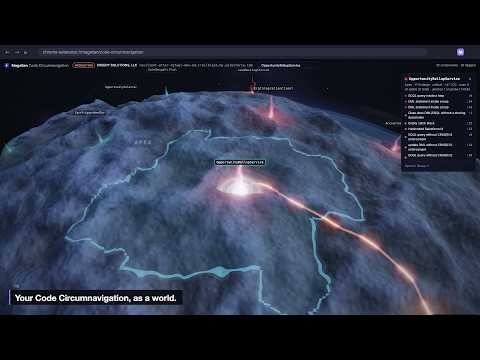
Magellan is a best-practices analyzer for Salesforce that lives in Chrome's side panel. Open an Apex class, trigger, Flow or Lightning Web Component in Setup and Magellan ranks what's wrong with it, worst first: SOQL and DML inside loops, missing sharing declarations, hardcoded Ids and URLs, Flows with no fault path, console.log left in components, and 40+ more rules drawn from PMD, Lightning Flow Scanner and eslint-plugin-lwc. Each finding links to the line and to the docs that explain the fix. The big picture: • Atlas scans the whole org in one pass. Findings are grouped by component, worst first, with counts for critical, warning and info, so you can see where the debt actually lives. Export to CSV or JSON. • What's on fire: Magellan reads failed Apex jobs and errored Flow interviews, so a class that's risky AND failing in production jumps to the top of the list. • Explore in 3D turns your org into a world. Each group of components is a continent, managed packages are islands, and every component is a torch. The hotter and more alive the torch, the worse the component, and anything failing right now burns brightest. Fly in, hover for details, and click through to Setup. Built for admins, developers and architects who want answers without installing anything in the org: • Read-only. Magellan never writes to your org. It only reads. • Private by design. Your code and metadata never leave your browser. The rules engine runs locally, and every request goes straight from your browser to your own Salesforce org. • Nothing to install in Salesforce. Magellan reuses the session you're already signed in with, and works in production and sandboxes. A loud PROD / Sandbox badge always tells you which org you're looking at. Questions or ideas: chris@creedysolutions.com
0 out of 5No ratings
Details
- Version0.2.4
- UpdatedNovember 9, 2026
- Size539KiB
- LanguagesEnglish (United States)
- DeveloperCREEDY SOLUTIONS, LLCWebsite
506 Coventry Ln Mackinaw, IL 61755-8817 USEmail
creedysolutions@gmail.comPhone
+1 309-840-2916 - TraderThis developer has identified itself as a trader per the definition from the European Union and committed to only offer products or services that comply with EU laws.
- D-U-N-S129532585
Privacy

Magellan — Salesforce best-practices analyzer has disclosed the following information regarding the collection and usage of your data. More detailed information can be found in the developer's privacy policy.
Magellan — Salesforce best-practices analyzer handles the following:
This developer declares that your data is
- Not being sold to third parties, outside of the approved use cases
- Not being used or transferred for purposes that are unrelated to the item's core functionality
- Not being used or transferred to determine creditworthiness or for lending purposes
Support
For help with questions, suggestions, or problems, visit the developer's support site