

Maestro Meeting Timer: Side Panel Countdown

Overview
A high-visibility, single-timer focus tool designed for meetings and presentations with Side Panel support.
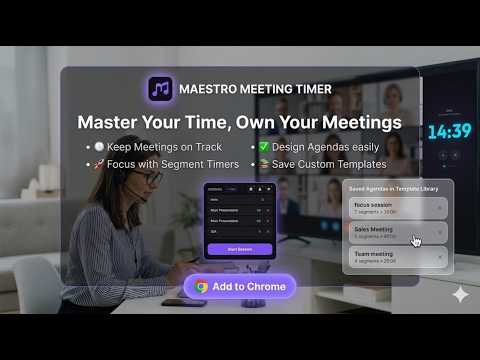
Master your time WITHOUT switching tabs. The high-visibility meeting timer and professional agenda manager built exclusively for the Chrome Side Panel. 🚀 NEW: Maestro Mode (Segmented Agendas) Don’t just time your meeting—master it. Maestro now allows you to break your sessions into logical segments. Define your Intro, Pitch, Tech Demo, and Q&A—the timer will automatically transition between them with a subtle chime, ensuring you never run over on the important parts. ✨ Key Features for Professionals Persistent Side Panel Timer: Keep your countdown in sight at all times. It stays docked on the right while you navigate between your slide deck, browser tabs, or meeting window. Segmented Meetings (Maestro Mode): Build complex session structures and let Maestro guide you through each milestone automatically. Template Library: Save your common agendas (e.g., "Weekly Sync," "Discovery Call") and load them with a single click. [FREE DURING BETA] Immersive Meeting Mode: One-click start removes all setup controls, leaving only a massive, high-contrast clock that’s easy to read even from a distance. One-Click Presets: Instantly launch time-boxing sessions for standups (5m), discovery calls (15m), or deep work (30m, 60m). Premium Aesthetics: Crafted with a sleek dark-mode design and modern typography (Inter & Outfit) for a professional workspace feel. 🎁 FREE BETA ACCESS We are currently in Free Beta! While we finalize our subscription platform, all premium features—including the Template Library and Unlimited Agenda Segments—are completely free for our early testers. Try "Maestro Mode" today! 🚀 Why Maestro? Most browser timers are either too cluttered or disappear the moment you click away. Maestro was built for the "flow state." It’s the ultimate presentation clock for keynote speakers and a reliable interview timer for recruiters who need to hit specific milestones without checking their phones. 🛠 Versatile Use Cases Agile Teams: Time-box your daily standups and segment your retrospectives. Public Speakers: Use it as a secondary presentation clock while navigating your browser-based slides. Recruiters: The perfect interview timer to ensure you leave exactly 5 minutes for candidate Q&A. Educators: Run timed classroom exercises with clear, high-visibility segment transitions. How to Use: 1- Click the Maestro icon in your toolbar to open the Side Panel. 2- Enter a quick duration or build a multi-part Agenda in Maestro Mode. 3- Click "Start Session" to enter Immersive Mode. 4- Focus on your performance while your countdown stays pinned to your view! * Part of the Maestro Personal Assistant suite.
0 out of 5No ratings
Details
- Version1.1.0
- UpdatedApril 28, 2026
- Offered bykouissar
- Size2.2MiB
- LanguagesEnglish
- Developer
Email
kouissar@gmail.com - Non-traderThis developer has not identified itself as a trader. For consumers in the European Union, please note that consumer rights do not apply to contracts between you and this developer.
Privacy

This developer declares that your data is
- Not being sold to third parties, outside of the approved use cases
- Not being used or transferred for purposes that are unrelated to the item's core functionality
- Not being used or transferred to determine creditworthiness or for lending purposes
Support
For help with questions, suggestions, or problems, visit the developer's support site