

Macify - Gorgeous Aerial Videos as Your New Tab

Overview
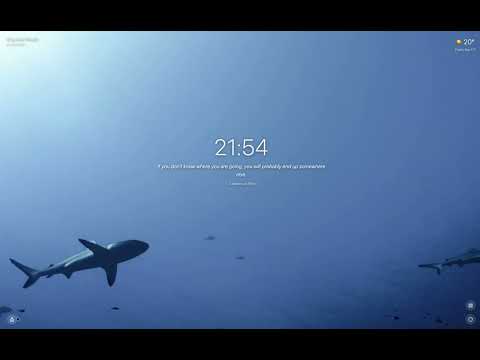
Transform Chrome's new tab into macOS's gorgeous aerial screensaver videos.
Turn your Chrome new tab into a calm, cinematic moment. 🎥 156 macOS 4K aerial videos: landscapes, cities, underwater, space — beauty without equal. 🧘 Mindful Zen mode: fullscreen video + optional ambient music + on-screen breathing guide (Coherent 5–5 / Box 4–4–4–4 / Relaxing 4–7–8) + gentle break reminders + fixed-length auto exit. Make any moment a meditation. 🌤️ Live weather: current temperature, "feels like", 3-day forecast, UV, wind, air quality. 🌄 Take-a-walk panel: shows the next sunrise / sunset with a minute-precision countdown, so you don't miss the light. 📌 Quick access: one click to your most-visited sites. 💬 Random quote: a different inspiring quote each time you open a new tab. Optionally translated into your display language using Chrome's on-device Translator API. 🖥️ Works everywhere: not on macOS? No worries — the extension works just the same, no setup required. Install, optionally enter your city for weather, and enjoy a beautiful new tab page.
4.9 out of 525 ratings
Details
- Version2.2.0
- UpdatedJune 8, 2026
- Size206KiB
- Languages4 languages
- DeveloperWebsite
Email
jason5ng32@gmail.com - Non-traderThis developer has not identified itself as a trader. For consumers in the European Union, please note that consumer rights do not apply to contracts between you and this developer.
Privacy

Macify - Gorgeous Aerial Videos as Your New Tab has disclosed the following information regarding the collection and usage of your data. More detailed information can be found in the developer's privacy policy.
Macify - Gorgeous Aerial Videos as Your New Tab handles the following:
This developer declares that your data is
- Not being sold to third parties, outside of the approved use cases
- Not being used or transferred for purposes that are unrelated to the item's core functionality
- Not being used or transferred to determine creditworthiness or for lending purposes
Support
For help with questions, suggestions, or problems, please open this page on your desktop browser