

Mac-like Tab Group Switcher
1 rating
)
Overview
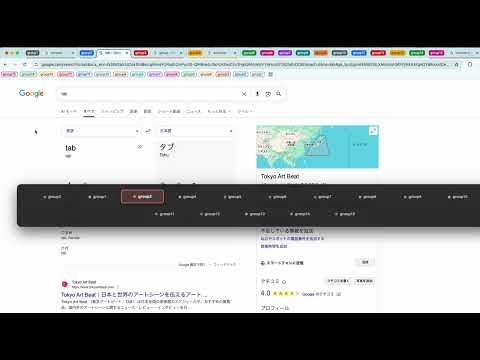
Visually switch Chrome Tab Groups like macOS Cmd+Tab using Option+Q.
本拡張機能はGeminiによって開発されています。 This extension was developed by Gemini. タブグループは便利ですが、マウスでクリックして切り替えるのは面倒ではありませんか? この拡張機能は、macOS標準の「アプリスイッチャー(Command + Tab)」と同じ操作感と見た目を、Chromeのタブグループに持ち込みます。 ✨ 主な機能: - 直感的なショートカット: Option + Q を押すとメニューが表示されます。キーを押しっぱなしにして Q で選択(Shift + Q で逆順)、Option を離すと決定。マウスでの選択も可能です。 - スマートな並び順 (MRU): 「最近使った順」にグループが並ぶため、2つの作業グループを交互に行き来するのが劇的に速くなります。 - グループカラーの反映: Chromeで設定したタブグループの色が、メニューのアイコンや枠線にそのまま反映されます。 ⚡️ 使い方: 1. Option (Alt) キーを押しながら Q を押します。 2. Option キーを押したまま、Q を押して移動したいグループを選びます(Shift + Q で逆順)。 3. Option キーを離すと、そのグループのタブに切り替わります。 キャンセル: 切り替えを中止したい場合は、Esc キーを押すか、メニューの外側(背景)をクリックしてください。 ⚠️ 注意事項: - 動作しないページについて: Chromeのセキュリティ仕様上、「新しいタブ」画面(初期画面)、Chrome設定ページ、Chromeウェブストアでは、この拡張機能は動作しません(メニューが表示されません)。これは不具合ではなくChromeの制限によるものです。 - テキスト入力について: 入力フォームでの誤入力を防ぐ強力な対策を行っていますが、一部のWebサイトではショートカットキー入力時に文字(œ や q)がテキストボックスに入力されてしまう場合があります。 - ショートカットキーの変更について: 現在のバージョンでは、起動ショートカットは Option + Q (Alt + Q) に固定 されており、変更することはできません。 - 特定ページでの無効化について: 現在のバージョンでは、特定のサイトやページでのみ機能を停止(除外設定)することはできません。 - プライバシーについて: この拡張機能は画面上にメニューを描画するために全ページへのアクセス権限を使用しますが、キー入力データの収集や外部への送信は一切行いません。 ------ Chrome Tab Groups are great for organizing, but switching between them usually requires mouse clicks. This extension brings the fluid, visual experience of the macOS App Switcher (Cmd + Tab) directly to your Chrome Tab Groups. ✨ Key Features: - Intuitive Shortcuts: Press Option + Q to open the switcher. Hold Option and tap Q to cycle through groups (or Shift + Q for reverse), then release to switch. Mouse selection is also supported. - Smart Sorting (MRU): Groups are sorted by "Most Recently Used." This makes toggling back and forth between two active projects instantaneous. - Visual Context: The switcher inherits the colors you've assigned to your Chrome Tab Groups. ⚡️ How to Use: 1. Hold the Option (Alt) key and press Q. 2. While holding Option, press Q to cycle through your groups (or Shift + Q to go backward). 3. Release the Option key to switch to the selected group's active tab. To Cancel: Press Esc or click outside the menu (background) to close the switcher without switching. ⚠️ Notes: - Restricted Pages: Due to Chrome's security policies, this extension cannot function on the "New Tab" page, Chrome Settings, or the Chrome Web Store. The menu will not appear on these pages. - Text Input Conflicts: Although advanced measures are implemented to prevent text input conflicts, on rare websites, the shortcut character (œ or q) may accidentally be entered into text fields. - Fixed Shortcut Key: In the current version, the shortcut key is fixed to Option + Q (Alt + Q) and cannot be customized. - No Exclusion List: It is not currently possible to disable the extension only on specific websites or pages. - Privacy Policy: This extension requires access to all pages solely to render the visual overlay on top of the website. It does not collect, store, or transmit any of your keystrokes or browsing data.
5 out of 51 rating
Details
- Version1.0
- UpdatedDecember 4, 2025
- Offered byyuki.midori17
- Size8.1KiB
- Languages日本語
- Developer
Email
yuki.midori17@gmail.com - Non-traderThis developer has not identified itself as a trader. For consumers in the European Union, please note that consumer rights do not apply to contracts between you and this developer.
Privacy

This developer declares that your data is
- Not being sold to third parties, outside of the approved use cases
- Not being used or transferred for purposes that are unrelated to the item's core functionality
- Not being used or transferred to determine creditworthiness or for lending purposes