

LyricVibe — Kinetic Lyrics Overlay
2 ratings
)
Overview
Overlay synced kinetic lyrics on any music tab — YouTube Music, Spotify, SoundCloud, and more.
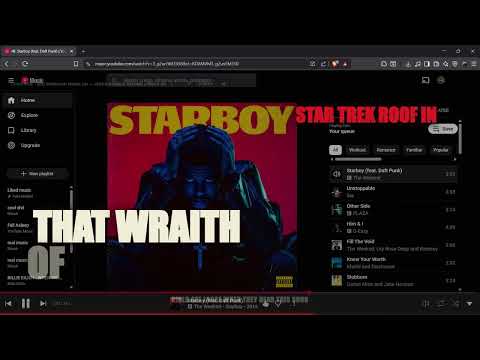
🆕 UPDATED (v0.4.3): Fixed a bug where lyrics from the wrong song could show up during track changes, plus false "server down" warnings on slow (but working) requests. song detection is better than previous version. - Added a new sync button in lyricvibe bar to automatically sync and match the lyrics speed and animation. - "Flow'' Added a new lyrics style that makes lyrics reading experience efficient. — LyricVibe overlays full-screen, word-by-word animated lyrics directly on your YouTube Music, Spotify, and SoundCloud tabs — synced perfectly to the beat. No setup. Just play a song and press Ctrl+Shift+L. WHAT IT DOES LyricVibe automatically detects whatever song is playing, fetches synced lyrics, and renders them as a full-screen kinetic typography overlay right in your browser tab. Every word animates in exactly when it's sung. FEATURES - Detects whatever song is playing and fetches synced lyrics automatically - Animates them word-by-word, locked to the beat - Works on **YouTube Music**, **Spotify Web Player**, and **SoundCloud** - Automatically catches the next track when a song changes — no need to retrigger it - 13 visual themes — press `T` to switch between them while listening - Remembers your sync preference per song so you only have to nudge it once - See-through mode (`B`) so the music video stays visible behind the lyrics - Adjust text size with `+` / `-` - Built-in shortcuts panel — no need to memorize anything - 100% free, no account, no tracking, no backend server - Smart sync engine with real-time auto-calibration, so timing stays accurate across genres and tempos -"Sync" press this button to automatically reset the lyrics and match it with the speed and animation. WHY INSTALL IT Reading flat, static lyrics is boring. LyricVibe turns your music tab into something closer to a lyric video — built for people who want to actually feel the words while they listen, not just glance at them. PRIVACY 100% client-side. No backend server, no analytics, no audio recording, no accounts. Only the song title and artist are sent (to fetch lyrics) — nothing else ever leaves your browser. Free and open source.
5 out of 52 ratings
Details
- Version0.4.3
- UpdatedJuly 23, 2026
- Offered byriteshzavar2905
- Size57.08KiB
- LanguagesEnglish
- Developer
Email
riteshzavar771@gmail.com - Non-traderThis developer has not identified itself as a trader. For consumers in the European Union, please note that consumer rights do not apply to contracts between you and this developer.
Privacy

This developer declares that your data is
- Not being sold to third parties, outside of the approved use cases
- Not being used or transferred for purposes that are unrelated to the item's core functionality
- Not being used or transferred to determine creditworthiness or for lending purposes
Support
For help with questions, suggestions, or problems, please open this page on your desktop browser