


Overview
Restyle subtitles on YouTube, Netflix and more with any font, size, color or outline, plus ambient light that follows the picture.
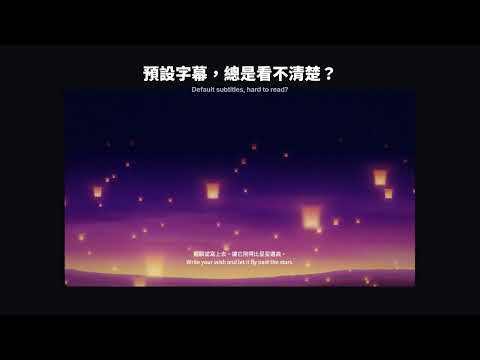
🌙 Subtitles your way. Light that follows the picture. Default captions too small, too thin, or lost against a bright scene? Want to watch in a font you actually like? LunaSub hands you the typeface, size, color and shadow. Version 1.3 adds a glow around the player that shifts with every scene, for a home-theater feel right in your browser. ✨ New in v1.3: Ambient Light • Six effects: Soft, Immersive, LED, Mono, Neon and Reflection, each with recommended settings • Follow the picture in real time, or pick a fixed color • Tune intensity, blur, spread (up to 400%), fade-in time, saturation, brightness, contrast and warmth • Letterbox bars light up automatically; when the video fills the player, shrink it to 70–99% to leave a glowing frame • Page Glow on YouTube and bilibili (dark theme) extends the light across the whole page • Choose which layouts use it: default, theater and fullscreen • The glow sits beneath the player, so the text and controls stay crisp on top • Drawing pauses while the video is paused or the tab is hidden; choose 15, 30 or 60 fps 🔤 Three font sources, CJK included • 56 curated Google Fonts, including Noto Sans TC, Noto Serif TC, LXGW WenKai TC, Zen Maru Gothic and Playfair Display • Upload your own .ttf, .otf or .woff2 files; large CJK files work too, and they stay on your computer • Use anything installed on your computer (Local Font Access) 🎨 Fine-tune every detail • Size, weight (100–900), color, line height and letter spacing • Background: none, translucent box, shadow or outline • Shadow styles: soft, hard or glow, in any color, sized in 0.1 steps • Position: keep the original placement, or set the distance from the bottom, alignment and maximum width • Responsive sizing scales with the video, fullscreen included • Live preview in the popup, with a contrast estimate when you use a background box • Five built-in presets: classic shadow, cinema soft, high contrast, yellow outline and minimal 📺 A separate profile for every site Turn on a platform profile and each site keeps its own text style and lighting. In overlay mode (TextTrack overlay), LunaSub keeps WebVTT italics, ruby annotations, vertical text and cue positions, so anime and Japanese dramas display correctly. ▶ Where it works YouTube, Netflix, Disney+, Prime Video, bilibili and four more services work out of the box. 15 more streaming services, many of them from Taiwan, can be added one at a time from the popup (experimental; permission is requested for that site only). The full list is in the fifth screenshot. ⌨️ Keyboard shortcuts • Ctrl+Shift+L (⌘+Shift+L on Mac): turn LunaSub on or off • Alt+Shift+↑ / ↓: larger / smaller text • Alt+Shift+P: cycle style presets • Move text up or down and toggle ambient light: assign your own keys at chrome://extensions/shortcuts 🔒 Privacy and permissions • No ads, no browsing-history tracking, no personal data collection • Settings sync through your Chrome account; uploaded files stay on your computer • Ambient light samples a downscaled frame locally; frames are never stored or sent anywhere • Experimental sites ask for permission one site at a time • Google Fonts are downloaded from Google when you pick one ❓ FAQ Q: Why can't I change some videos? A: Text burned into the picture can't be restyled. LunaSub works on the caption tracks a service provides, so turn captions on in the player first. Q: Why is the light a fixed color on some services? A: Browsers don't let extensions read DRM-protected frames. LunaSub switches to the color you choose and never tries to bypass the protection. Q: The style isn't applied. What should I do? A: Reload the video page. If it still doesn't work, click the LunaSub icon to see the detection status, press "複製診斷" (Copy diagnostics) and send it to us so we can update support. Note: the settings panel is in Traditional Chinese, and most settings also carry an English label. LunaSub is an independent extension and is not affiliated with or endorsed by any of the platforms mentioned. All platform names and trademarks belong to their respective owners.
Details
- Version1.4.0
- UpdatedOctober 14, 2026
- Offered byChaeChae
- Size199KiB
- Languages4 languages
- Developer
Email
tony890302@gmail.com - Non-traderThis developer has not identified itself as a trader. For consumers in the European Union, please note that consumer rights do not apply to contracts between you and this developer.
Privacy

This developer declares that your data is
- Not being sold to third parties, outside of the approved use cases
- Not being used or transferred for purposes that are unrelated to the item's core functionality
- Not being used or transferred to determine creditworthiness or for lending purposes


