


Overview
Local-only TOTP authenticator. Secrets stay encrypted on your device — no external network requests or user data transmitted.
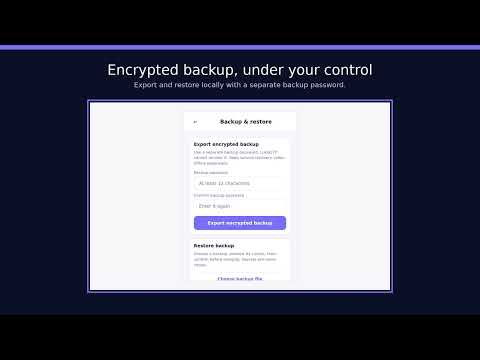
LukaOTP is a privacy-focused, local-only authenticator for time-based one-time passwords (TOTP). It is designed for people who want fast access to verification codes without cloud synchronization. Core features: • No external network requests; no user data transmitted — verification-code generation, encryption, decryption, QR recognition, and search all run locally on your device. • Encrypted local vault — Account secrets are protected with AES-256-GCM. The encryption key is derived from your master password with Argon2id and is not stored in plaintext. • Optional remembered unlock — After unlocking, a derived session key can keep the vault available until 1, 5, 15, or 30 minutes of inactivity, or until the browser closes. The default is 15 minutes. Your master password is never stored. Restart, extension reload/update/disable, timeout, and manual lock clear the session. Real user interaction can extend it; automatic TOTP refresh cannot. • Encrypted offline backup and restore — Create a user-controlled encrypted JSON backup with a separate backup password, choose where to download it, and restore locally after a secret-free preview. LukaOTP does not provide cloud recovery or account-based synchronization. • Standards-based TOTP — Generates RFC 6238 codes with supported SHA algorithms, 6- or 8-digit codes, and standard time periods. • QR code import — After your click, take one screenshot of the currently visible tab or choose a local image. QR recognition stays on your device; the image is not uploaded or retained. • Search and quick copy — Filter accounts by service or account name, then click an account card to copy its verification code. The confirmation does not display the code. • Favorites and global ordering — Favorite important accounts so they stay above regular accounts. When search is clear, drag accounts across services to save a preferred order within the favorite or regular tier. • Multilingual interface — Automatically follows Chrome or lets you choose English, Simplified Chinese, or Traditional Chinese. Privacy and recovery: LukaOTP has no account system, analytics, advertisements, trackers, cloud recovery, or multi-device sync. Encrypted backups stay in the download location you choose and are restored locally. If you forget your master password or backup password, uninstall the extension, or clear local data before creating a backup, your vault may be unrecoverable. Keep each service's recovery codes in a separate safe place. Privacy policy: https://lukaotp.pages.dev/privacy-policy.html
0 out of 5No ratings
Details
- Version0.3.5
- UpdatedSeptember 4, 2026
- Size335KiB
- Languages3 languages
- DeveloperWebsite
Email
willylins@gmail.com - Non-traderThis developer has not identified itself as a trader. For consumers in the European Union, please note that consumer rights do not apply to contracts between you and this developer.
Privacy

LukaOTP has disclosed the following information regarding the collection and usage of your data. More detailed information can be found in the developer's privacy policy.
LukaOTP handles the following:
This developer declares that your data is
- Not being sold to third parties, outside of the approved use cases
- Not being used or transferred for purposes that are unrelated to the item's core functionality
- Not being used or transferred to determine creditworthiness or for lending purposes
Support
For help with questions, suggestions, or problems, visit the developer's support site