

Xtractly — Web to React & Tailwind for AI Agents
2 ratings
)
Overview
Capture any website element as React or Tailwind code, plus its colors and fonts, so your AI coding agent builds in your style.
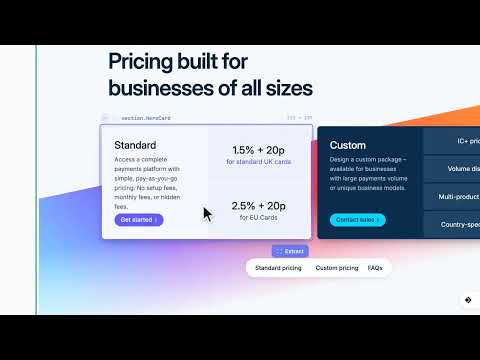
Xtractly is a Chrome extension that turns any element on a live website into clean, usable code. Hover a button, card, navbar or whole section, click, and get it as React, Tailwind CSS, HTML, Vue or Svelte — with its colors, fonts and assets — ready to paste into your project or save to your library. Collect the components, colors and fonts you like from real sites into your own library, then let your AI coding assistant build with them. Built for front-end developers, designers, and anyone building with AI coding assistants. WHAT YOU CAN DO • Copy any component as code. Hover to highlight, press ↑ / ↓ to move to the parent or child element, and click to capture. • Tailwind or inline CSS. Get Tailwind utility classes, or inline styles for a pixel-exact copy. Hover states and responsive breakpoints are kept instead of being flattened away. • Use your component library. An optional setting builds React + Tailwind captures from shadcn/ui components, keeping the captured styles. • Check the copy. Match compares a capture against the original page and shows a similarity score with the differences highlighted. • Three extraction modes. Clone gives an exact, self-contained copy. Clean keeps only the styles that matter, for production-ready code. Wireframe keeps structure only — layout, spacing and text in neutral greys — ready to re-skin with your own design system. • Extract colors. See every color on the page ranked by how much it's used, with primary, accent and surface roles suggested. Copy any color in the format you need, sample any pixel with the eyedropper, and export the page's colors as design tokens for your project or for Figma. • Identify fonts. See the page's full type scale, each style rendered as it appears, with where every font is loaded from. Copy any text style as CSS or Tailwind, font import included. • Download images and SVGs. Find every image, icon and SVG on the page. Copy an SVG as a component, or download everything as one .zip. • Grab animations. Replay a page's CSS animations and transitions, then copy them as code. • Screenshot any region. Drag to capture part of the page as a PNG; it lands in your Clipboard with everything else. • Paste into Figma. Copy a capture and paste it straight into Figma as vector layers. YOUR LIBRARY AND YOUR AI AGENT Everything you capture can be saved to your library in the Xtractly web app (xtractly.app): • Edit any component live in Studio with an instant preview, keep variants side by side, and restore any earlier version. • Send captures to your AI agent (optional, off by default): capture an element in the browser, then ask your coding assistant to build it — it fetches what you just captured. • Bring your own AI: connect your AI coding assistant through the Agent Bridge, an MCP server, so it builds with your real components and design tokens instead of guessing. Xtractly runs no AI of its own. HOW IT WORKS 1. Click the Xtractly icon on any website, or press Alt+C. 2. Hover and click the element you want. 3. Paste the code into your project, or save it to your library. KEYBOARD SHORTCUTS Alt+C — Extract an element Alt+F — Fonts & colors Alt+P — Pick a color Alt+D — Images & SVGs Change them any time at chrome://extensions/shortcuts. WORKS ON ANY SITE Xtractly reads the rendered page, not the source code, so it works the same whatever framework or site builder a page was made with. Canvas-drawn interfaces and a few sites with very strict security policies can limit what's captured. Works in Chrome and other Chromium-based browsers. FREE TRIAL AND LIFETIME 7-day free trial: every new account gets every feature for 7 days — no card needed. Sign in with Google or GitHub. Lifetime: a one-time purchase, no subscription, that keeps every feature after the trial — unlimited code exports, the library with editing in Studio, bookmarks, full-page export, the Agent Bridge, REST API access and every future update. When a trial ends without Lifetime, hover-inspecting still works and your saved library stays viewable, but copying, exporting, downloading and saving need Lifetime. PRIVACY Xtractly only reads a page's content when you use one of its tools. Nothing is saved to your account unless you choose to save it, and we never sell your data or use it for advertising. Privacy policy: https://www.xtractly.app/privacy Docs: https://www.xtractly.app/docs Support: dondotdev@outlook.com
1 out of 52 ratings
Details
- Version2.0.2
- UpdatedOctober 18, 2026
- FeaturesOffers in-app purchases
- Offered byddotdev
- Size242KiB
- LanguagesEnglish
- DeveloperAlele Donald Obote
10b waterstone house 13 central hill London SE19 1BG GBEmail
donaldalele@gmail.comPhone
+44 7398 473981 - TraderThis developer has identified itself as a trader per the definition from the European Union and committed to only offer products or services that comply with EU laws.
Privacy

Xtractly — Web to React & Tailwind for AI Agents has disclosed the following information regarding the collection and usage of your data. More detailed information can be found in the developer's privacy policy.
Xtractly — Web to React & Tailwind for AI Agents handles the following:
This developer declares that your data is
- Not being sold to third parties, outside of the approved use cases
- Not being used or transferred for purposes that are unrelated to the item's core functionality
- Not being used or transferred to determine creditworthiness or for lending purposes
Support
For help with questions, suggestions, or problems, please open this page on your desktop browser