


Overview
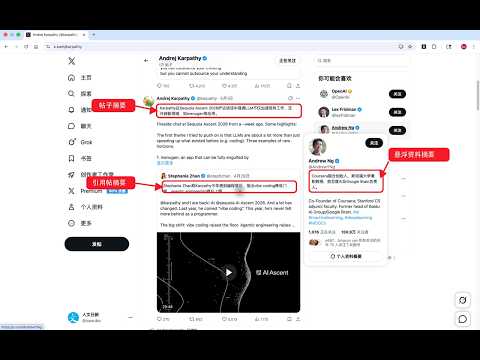
Compact summaries beside loaded content, a local bookmark library for worthwhile sources, and AI Insights when you ask.
BriefFeed adds AI summaries beside supported content already loaded in Chrome. See the key points as you browse, and return to the original whenever you want to read further. Explore all features, real examples, and the demo video: https://brieffeed.app Save, organize, and find sources Keep useful links and summaries in a local library. Browse saved items by author, assign custom tags to several items at once, or filter the library by tag. Search saved items and recent reading by keyword, then save sources directly from the results. History covers only bounded content BriefFeed encountered on supported pages within your selected retention period. Create AI Insights in Reading workspace Open Reading workspace from the extension menu to search your reading and revisit saved sources and authors. When you ask for an AI Insights brief, BriefFeed uses supported content loaded in this browser today and includes links back to the sources. Supported content Summaries cover selected social posts, discussion threads and comments, opened note details, individual answers, news reports, interviews, other articles and newsletters, paper abstracts and rendered paper pages, product and repository pages, podcast show notes, and available video text. Continue across devices Connect a compatible BriefFeed Mac app to sync saved items and browsing history within your selected retention period. Keep the Mac app running while syncing; content can continue through your iCloud account to your Apple devices. Export to research tools External sync is optional and user-triggered. Notion sync uses the Notion integration configured in this browser. NotebookLM sync uses the current browser session and the notebook you select. Selected sync payloads are sent directly from your browser to the destination service and are not routed through BriefFeed servers. Privacy and site access BriefFeed works from visible or loaded source text in your browser session. For supported social and discussion surfaces, summaries stay close to the original post or discussion. For selected article and research pages, BriefFeed uses only the rendered title, author information, abstract, or bounded page text needed to create the summary. On optional opened article and individual-answer pages, BriefFeed uses only the rendered title, byline, and visible body. For an opened individual answer, the question title is used only as context and the summary covers that answer alone; BriefFeed does not combine other answers or infer a consensus. It does not access site APIs, initial-state payloads, comments, recommendations, account/session data, or content that remains collapsed, login-gated, or paid. On optional opened social-note pages, BriefFeed reads only the visible title and caption needed for the summary. It does not analyze image text, video, or audio, and it does not read comments, recommendations, cookies, or account/session data from those pages. On optional public paper pages, BriefFeed uses only the visible title, authors, TL;DR, abstract, and keywords needed for the summary. It does not access PDFs, reviews, rebuttals, decisions, ratings, comments, hidden fields, or private forum content. For supported video pages, BriefFeed summarizes available text associated with the current video, such as transcripts, captions, subtitles, timeline text, or chapter markers. It does not analyze audio or video directly. Bookmarks are created only when you explicitly save a source. A bookmark may retain the source URL, summary, tags, author label, bounded page-visible source text, and visible media context needed to revisit that saved item. BriefFeed is designed around a narrow privacy boundary. It does not ask for social-media passwords, and it does not send cookies, session tokens, login credentials, account secrets, private messages, browser history, full DOM snapshots, follower graphs, or hidden platform payloads to BriefFeed servers. Summary requests are limited to the source URL or identifier, author display label, timestamp, visible or loaded source text, platform, detected language, summary language, and optional visible link metadata or quoted-post context. Raw source bodies are not logged or retained longer than needed for the current request and cache, except for bounded page-visible text in bookmarks that the user explicitly saves and retained supported reading content within the selected history period. Some supported pages require optional site access. By default, BriefFeed asks only for access to the exact site the user chooses to enable. An advanced setting can grant access to all HTTPS sites once, but BriefFeed activates only its packaged support for recognized pages. This permission is not used for general browsing, tracking, analytics, cookies, browser history, or hidden content. BriefFeed is an independent tool and is not affiliated with the websites or external services it supports.
5 out of 51 rating
Details
- Version0.1.150
- UpdatedNovember 25, 2026
- Size1.53MiB
- Languages25 languages
- DeveloperWebsite
Email
hello@brieffeed.app - Non-traderThis developer has not identified itself as a trader. For consumers in the European Union, please note that consumer rights do not apply to contracts between you and this developer.
Privacy

BriefFeed: AI Summaries for Social Feeds has disclosed the following information regarding the collection and usage of your data. More detailed information can be found in the developer's privacy policy.
BriefFeed: AI Summaries for Social Feeds handles the following:
This developer declares that your data is
- Not being sold to third parties, outside of the approved use cases
- Not being used or transferred for purposes that are unrelated to the item's core functionality
- Not being used or transferred to determine creditworthiness or for lending purposes