


Overview
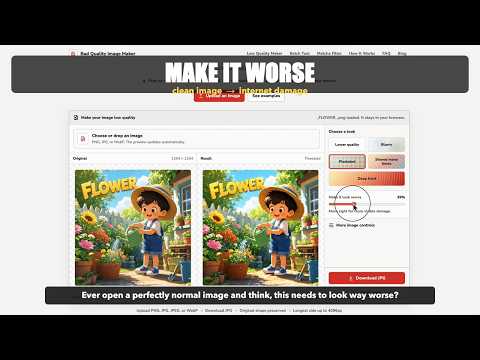
Make photos blurry, pixelated, compressed, deep fried, or black and white. Edit privately in your browser and save the result.
Give a perfectly good photo a perfectly bad look. Low Quality Image Maker opens a dedicated image editor from your Chrome toolbar. Choose your own photo, drag one into the editor, or paste an image. Pick a look, adjust its strength, compare the original with the result, and save your new image. Six looks to try: • Lower quality — a rougher, smaller copy. • Blurry — soft, out-of-focus edges. • Pixelated — big blocks with a retro feel. • Shared many times — a repeatedly saved and reposted look. • Deep fried — loud color and crunchy detail. • Black & white — remove the color or blend it back with the strength slider. Save the result as JPG, PNG, or WebP, or copy it as a PNG to paste elsewhere. Fine tune is available when you want more control over size, blur, color, contrast, and grain. Your photos stay on your device. There are no uploads, accounts, watermarks, ads, or analytics in the extension. All processing code and sample images are included, so editing works offline after installation. The extension does not read websites or browsing history. Clipboard access is used only when you click Copy image. Supports JPG, PNG, and WebP input up to 40 MiB and 80 megapixels. Large images are resized to fit within 4,096 pixels per side. Transparent areas are filled with a warm white background. Closing the editor clears the current in-memory photo and edits. Made by Bad Quality Image Maker. More image tools: https://badqualityimagemaker.com/
0 out of 5No ratings
Details
- Version1.0.0
- UpdatedOctober 25, 2026
- Size263KiB
- LanguagesEnglish (United States)
- DeveloperWebsite
Email
javainstalling@gmail.com - Non-traderThis developer has not identified itself as a trader. For consumers in the European Union, please note that consumer rights do not apply to contracts between you and this developer.
Privacy

This developer declares that your data is
- Not being sold to third parties, outside of the approved use cases
- Not being used or transferred for purposes that are unrelated to the item's core functionality
- Not being used or transferred to determine creditworthiness or for lending purposes
Support
For help with questions, suggestions, or problems, visit the developer's support site