

Loupewire: HTTP Request Inspector, Header Editor and Masked HAR Export

概述
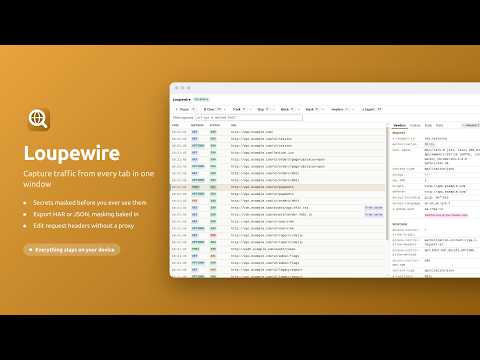
Capture traffic from every tab in one window, apply header rules, mask secrets and export HAR. All on-device, no accounts.
Loupewire opens one window that records the HTTP requests every tab and popup makes, so a flow that crosses several pages - a login that bounces through a redirect chain, a payment step that opens a verification window, a vendor checkout - reads as one list. Select any request to see its headers, cookies, form data and body, timing and redirect chain. Everything runs on your device. 🔍 CAPTURE ACROSS EVERY TAB - One tracker window records every tab and popup in the browser window it belongs to - Or narrow it to one tab and every tab or popup opened from it, so a login or checkout flow is recorded without the rest of the browser - Request and response headers, cookies, form data, request bodies, timing, redirect chain, resource type and server IP - Requests that were blocked or failed appear in the list with the reason - When the browser's site access setting hides some sites from the extension, the tracker says so and gives access back in one click - Open the tracker in its own window or as an ordinary browser tab, and move it between the two from its header without losing what it captured 📥 RESPONSE BODIES - Turn on response-body capture for a site, and the bodies of that page's own fetch and XHR calls appear beside each request, masked like every other value - A site covers its subdomains. Capture starts with the next page load, and nothing runs on a site you have not turned on - On a site you turn on, a script observes the page's calls without changing them, receives nothing from the extension, and is removed when the tracker closes - Import a HAR saved from DevTools to read every body it recorded, masked on screen and in the file you export again. The imported file is held in memory and never stored - A request without a body says why: a page that read its response as a stream, a call made by a worker, a request that is not a fetch or XHR call 🛡️ MASKING, ON SCREEN AND IN THE FILE - Add a pattern such as authorization or session, and every matching value shows only its first and last characters - In a JSON body, a pattern that names a key masks every value beneath that key - A built-in preset covers the common secret-bearing header and field names and is on by default - Masking is applied as the row is drawn, and there is no reveal button - a screenshot of the panel is already safe to attach 📤 EXPORT AND COPY, ALREADY REDACTED - Export as HAR 1.2, what vendors, developers and every network tool read, with response bodies where a request has one - Export as Loupewire JSON, which keeps what HAR has nowhere to put: each redirect leg, partial records, and how a multipart field was read - Choose what goes in: everything captured, only the rows you selected, or only what the filter shows. A file holding part of a session says so inside itself - Copy one request as redacted text, or as a redacted cURL command, for a ticket or a chat message ✏️ REQUEST HEADER RULES, WITHOUT A PROXY - Set a request header on every request whose URL matches a filter, for a staging API or a feature flag - Rules are applied by the browser's own declarative rule engine, and the captured request shows the header exactly as it was sent - Headers that belong to the connection itself, such as Host or Content-Length, are allowed and flagged with a warning - Rules last while the tracker window is open and stop when it closes 🎯 NARROW IT DOWN - Track and Skip patterns decide what is recorded, for the session or for every window - Filter the table by url, method, status, date and cache state, combined with & and | - Block requests by pattern to see how a page behaves when an endpoint is unavailable - Find text inside the request you have open - Pause and resume; clear everything, the selected rows, or the rows currently shown - Select several rows and export or clear only those 🌍 INTERFACE - Available in 8 languages, including right-to-left interfaces that mirror as a whole - Light, dark, or following the system, with a switch in the tracker header 🔒 ON-DEVICE, AND NOTHING ELSE - Captured headers, cookies, bodies and URLs, and any HAR you import, stay in the tracker window and are never written to disk unless you export them - Your patterns, rules, settings and the sites you turned body capture on for are stored in the browser's local extension storage - The extension makes no network requests of its own - No account, no telemetry, no analytics, no crash reporting ⚠️ WHAT IT DOES NOT DO Response bodies are captured only for the page's own fetch and XHR calls, on the sites you turn on. A body the page reads as a stream, a request made by a worker or service worker, and page loads, images and scripts have none in the live capture; save a HAR with DevTools and import it to read those. Loupewire does not attach a debugger to your tabs. 🚀 QUICK START 1. Install, then click the Loupewire icon in the toolbar 2. The tracker window opens and starts recording straight away 3. Browse in any tab of that window - rows appear as requests are made 4. Select a request to read its headers, then Export to attach a masked HAR to a ticket 📞 SUPPORT - Guides: https://loupewire.com/guides/ - Support: https://loupewire.com/support/ - GitHub: https://github.com/loupewire/loupewire-support 🔗 LINKS - Website: https://loupewire.com/ - Privacy Policy: https://loupewire.com/privacy-policy/ - Terms: https://loupewire.com/terms/
详情
隐私权

该开发者已声明,您的数据:
- 不会因未获批准的用途出售给第三方
- 不会为实现与产品核心功能无关的目的而使用或转移
- 不会为确定信用度或放贷目的而使用或转移
支持
若有任何疑问、建议或问题,请访问开发者的支持网站


