


概要
Capture traffic from every tab in one window, apply header rules, mask secrets and export HAR. All on-device, no accounts.
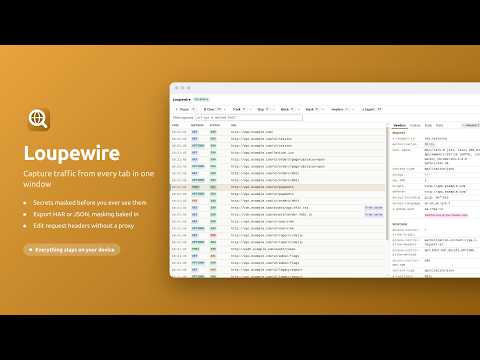
Loupewire opens one window that records the HTTP requests every tab and popup makes, so a flow that crosses several pages - a login that bounces through a redirect chain, a payment step that opens a verification window, a vendor checkout - reads as one list. Select any request to see its headers, cookies, form data and body, timing and redirect chain. Everything runs on your device. 🔍 CAPTURE ACROSS EVERY TAB - One tracker window records every tab and popup in the browser window it belongs to - Or narrow it to one tab and every tab or popup opened from it, so a login or checkout flow is recorded without the rest of the browser - Request and response headers, cookies, form data, request bodies, timing, redirect chain, resource type and server IP - Requests that were blocked or failed appear in the list with the reason - When the browser's site access setting hides some sites from the extension, the tracker says so and gives access back in one click - Open the tracker in its own window or as an ordinary browser tab, and move it between the two from its header without losing what it captured 📥 RESPONSE BODIES - Turn on response-body capture for a site, and the bodies of that page's own fetch and XHR calls appear beside each request, masked like every other value - A site covers its subdomains. Capture starts with the next page load, and nothing runs on a site you have not turned on - On a site you turn on, a script observes the page's calls without changing them, receives nothing from the extension, and is removed when the tracker closes - Import a HAR saved from DevTools to read every body it recorded, masked on screen and in the file you export again. The imported file is held in memory and never stored - A request without a body says why: a page that read its response as a stream, a call made by a worker, a request that is not a fetch or XHR call 🛡️ MASKING, ON SCREEN AND IN THE FILE - Add a pattern such as authorization or session, and every matching value shows only its first and last characters - In a JSON body, a pattern that names a key masks every value beneath that key - A built-in preset covers the common secret-bearing header and field names and is on by default - Masking is applied as the row is drawn, and there is no reveal button - a screenshot of the panel is already safe to attach 📤 EXPORT AND COPY, ALREADY REDACTED - Export as HAR 1.2, what vendors, developers and every network tool read, with response bodies where a request has one - Export as Loupewire JSON, which keeps what HAR has nowhere to put: each redirect leg, partial records, and how a multipart field was read - Choose what goes in: everything captured, only the rows you selected, or only what the filter shows. A file holding part of a session says so inside itself - Copy one request as redacted text, or as a redacted cURL command, for a ticket or a chat message ✏️ REQUEST HEADER RULES, WITHOUT A PROXY - Set a request header on every request whose URL matches a filter, for a staging API or a feature flag - Rules are applied by the browser's own declarative rule engine, and the captured request shows the header exactly as it was sent - Headers that belong to the connection itself, such as Host or Content-Length, are allowed and flagged with a warning - Rules last while the tracker window is open and stop when it closes 🎯 NARROW IT DOWN - Track and Skip patterns decide what is recorded, for the session or for every window - Filter the table by url, method, status, date and cache state, combined with & and | - Block requests by pattern to see how a page behaves when an endpoint is unavailable - Find text inside the request you have open - Pause and resume; clear everything, the selected rows, or the rows currently shown - Select several rows and export or clear only those 🌍 INTERFACE - Available in 8 languages, including right-to-left interfaces that mirror as a whole - Light, dark, or following the system, with a switch in the tracker header 🔒 ON-DEVICE, AND NOTHING ELSE - Captured headers, cookies, bodies and URLs, and any HAR you import, stay in the tracker window and are never written to disk unless you export them - Your patterns, rules, settings and the sites you turned body capture on for are stored in the browser's local extension storage - The extension makes no network requests of its own - No account, no telemetry, no analytics, no crash reporting ⚠️ WHAT IT DOES NOT DO Response bodies are captured only for the page's own fetch and XHR calls, on the sites you turn on. A body the page reads as a stream, a request made by a worker or service worker, and page loads, images and scripts have none in the live capture; save a HAR with DevTools and import it to read those. Loupewire does not attach a debugger to your tabs. 🚀 QUICK START 1. Install, then click the Loupewire icon in the toolbar 2. The tracker window opens and starts recording straight away 3. Browse in any tab of that window - rows appear as requests are made 4. Select a request to read its headers, then Export to attach a masked HAR to a ticket 📞 SUPPORT - Guides: https://loupewire.com/guides/ - Support: https://loupewire.com/support/ - GitHub: https://github.com/loupewire/loupewire-support 🔗 LINKS - Website: https://loupewire.com/ - Privacy Policy: https://loupewire.com/privacy-policy/ - Terms: https://loupewire.com/terms/
詳細
プライバシー

このデベロッパーは、お客様のデータについて以下を宣言しています
- 承認されている以外の用途で第三者に販売しないこと
- アイテムの中心機能と関係のない目的で使用または転送しないこと
- 信用力を判断する目的または融資目的で使用または転送しないこと
サポート
質問や提案、問題がある場合は、デベロッパーのサポートサイトにアクセスしてください。


