


Overview
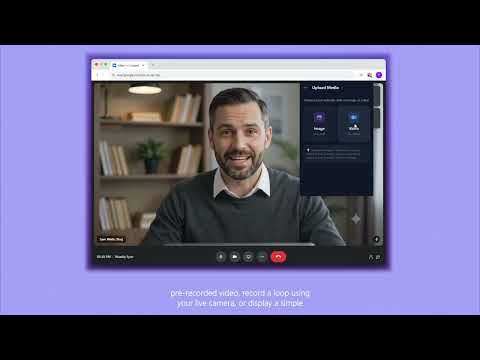
Virtual camera effects for video meetings. Loop videos, static images, or custom uploads as your camera feed.
Your camera feed, finally on your terms. Set it once. Look present, always. Record a short clip of yourself and let it loop seamlessly—giving you space to step away, collect your thoughts, or simply breathe while your camera stays consistent. Your best take, on repeat. Upload any video and use it as your camera feed. Bring the same polished presence to every meeting, without having to recreate it each time. A photo that speaks for itself. Sometimes a sharp, well-lit image is all you need. Choose one, set it as your camera feed, and let it do the talking. Introduce yourself with customizable name tags. Add your name, role, company, topic, or any other context directly to your outgoing camera feed. Personalize the font, text size, style, animation, position, and on-screen offset to create a nametag that fits your look. Choose from clean minimal, light glass, and dark glass designs, then place it exactly where you want it. One tool. Every platform. Zoom, Google Meet, Microsoft Teams, and other browser-based meeting platforms—if it asks for your camera, Looped works with it. No complicated setup and no platform-specific plugins. What happens in your browser stays in your browser. No uploads. No servers. No unnecessary data trails. Looped processes your media directly on your device, because what you share on camera is your business—not ours.
5 out of 53 ratings
Details
- Version1.0.11
- UpdatedAugust 16, 2026
- FeaturesOffers in-app purchases
- Size787KiB
- LanguagesEnglish
- DeveloperWebsite
Email
aryanpiyush095@gmail.com - Non-traderThis developer has not identified itself as a trader. For consumers in the European Union, please note that consumer rights do not apply to contracts between you and this developer.
Privacy

Looped has disclosed the following information regarding the collection and usage of your data. More detailed information can be found in the developer's privacy policy.
Looped handles the following:
This developer declares that your data is
- Not being sold to third parties, outside of the approved use cases
- Not being used or transferred for purposes that are unrelated to the item's core functionality
- Not being used or transferred to determine creditworthiness or for lending purposes
Support
For help with questions, suggestions, or problems, visit the developer's support site