


Overview
Read the transcript of any Loom video, jump to the second anything was said, and get AI summaries with timecoded action items.
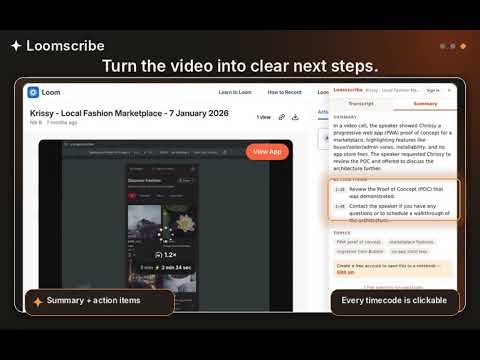
Stop scrubbing through Loom screen recordings. Loomscribe adds a transcript panel to any public Loom share page: READ INSTEAD OF WATCH Open a Loom, click the Loomscribe tab, and the full transcript is there — speaker labels, timestamps, copy-as-text. CLICK A TIMESTAMP, JUMP THE PLAYER Every timestamp is a button. Click one and the video jumps to that exact second. Skim the text, watch only the part that matters. AI SUMMARIES WITH TIMECODED ACTION ITEMS One click gets you a tight summary, the key topics, and a list of action items — each one timecoded and clickable too. HONEST FREE TIER Generous free daily runs with no account. Create a free Loomscribe account to raise the limits. No credit card, ever. WHAT IT READS (AND WHAT IT DOESN'T) The extension only runs on loom.com share pages and only reads the video you're viewing. Requests go to Loomscribe's own API. No browsing history, no other tabs, no data sales. Private and password-protected videos are not accessible — public and unlisted links only. Made by Loomscribe — the notebook for your Loom videos. Import recordings, chat with transcripts, and turn videos into summaries, action items, and blog posts at www.loomscribe.com.
5 out of 51 rating
Details
- Version0.1.2
- UpdatedAugust 13, 2026
- Size22.14KiB
- LanguagesEnglish
- DeveloperWebsite
Email
hey@zerodraft.studio - Non-traderThis developer has not identified itself as a trader. For consumers in the European Union, please note that consumer rights do not apply to contracts between you and this developer.
Privacy

Loomscribe - Video Transcripts & AI Summaries has disclosed the following information regarding the collection and usage of your data. More detailed information can be found in the developer's privacy policy.
Loomscribe - Video Transcripts & AI Summaries handles the following:
This developer declares that your data is
- Not being sold to third parties, outside of the approved use cases
- Not being used or transferred for purposes that are unrelated to the item's core functionality
- Not being used or transferred to determine creditworthiness or for lending purposes
Support
For help with questions, suggestions, or problems, visit the developer's support site